


Originally published: 06/11/2023 14:30
Last version published: 09/09/2026 12:18
Publication number: ELQ-45153-3
View all versions & Certificate
Last version published: 09/09/2026 12:18
Publication number: ELQ-45153-3
View all versions & Certificate

Candidate Assessment Form
HTML-based tool for HR specialist, created for candidate evaluation during an interview.
Description
📋 Candidate Assessment Tool — Interactive HTML ToolBy Data'sOk
Score, compare, and rank interview candidates side by side — with unlimited candidates, criteria you fully control, and a fair score that doesn't penalize "Not Applicable" answers.Most candidate scorecards lock you into a fixed template: a set number of candidates, a fixed list of questions, and a "maximum score" that doesn't adjust when something doesn't apply. This tool doesn't have those limits. It's a single, self-contained HTML file — open it in any browser, on any device, and start scoring. No installation, no macros, nothing to enable.
WHAT YOU GET
A single interactive HTML file, fully unlocked:
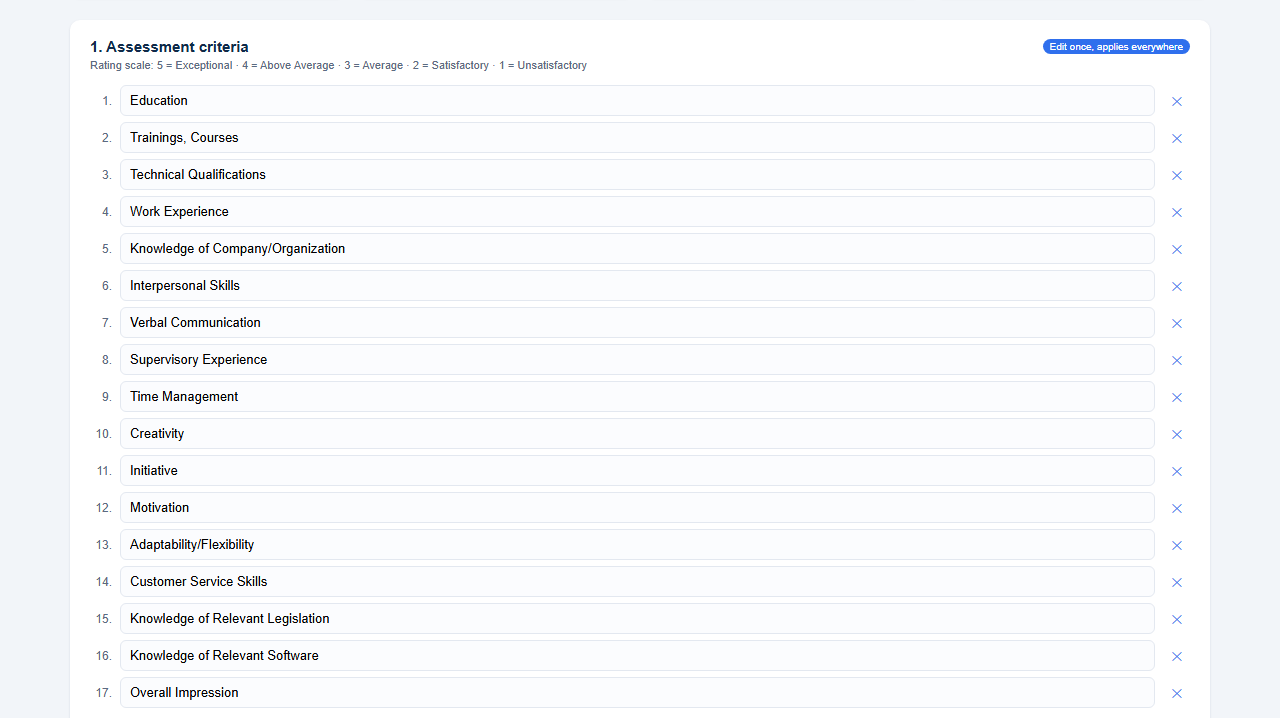
📝 Fully editable criteria — start from the built-in 17 (Education, Technical Qualifications, Interpersonal Skills, and more), or add, remove, and rename to fit any role. Edit once, and it applies to every candidate automatically.
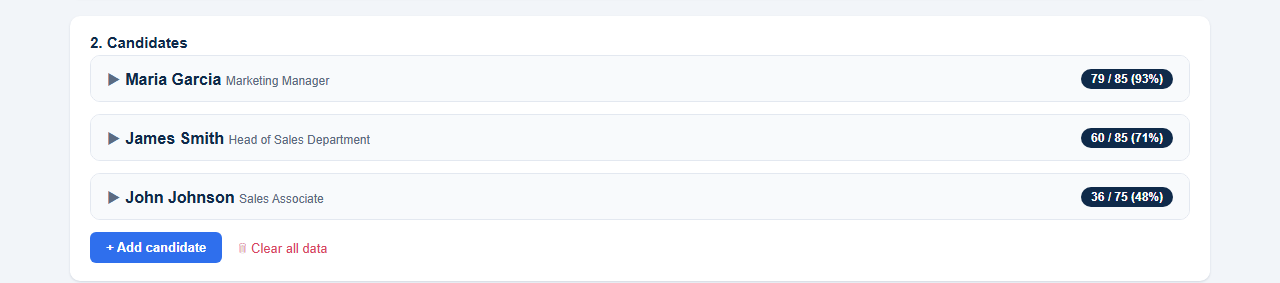
➕ Unlimited candidates — no cap. Add as many as you're actually interviewing, each with their own expandable card.
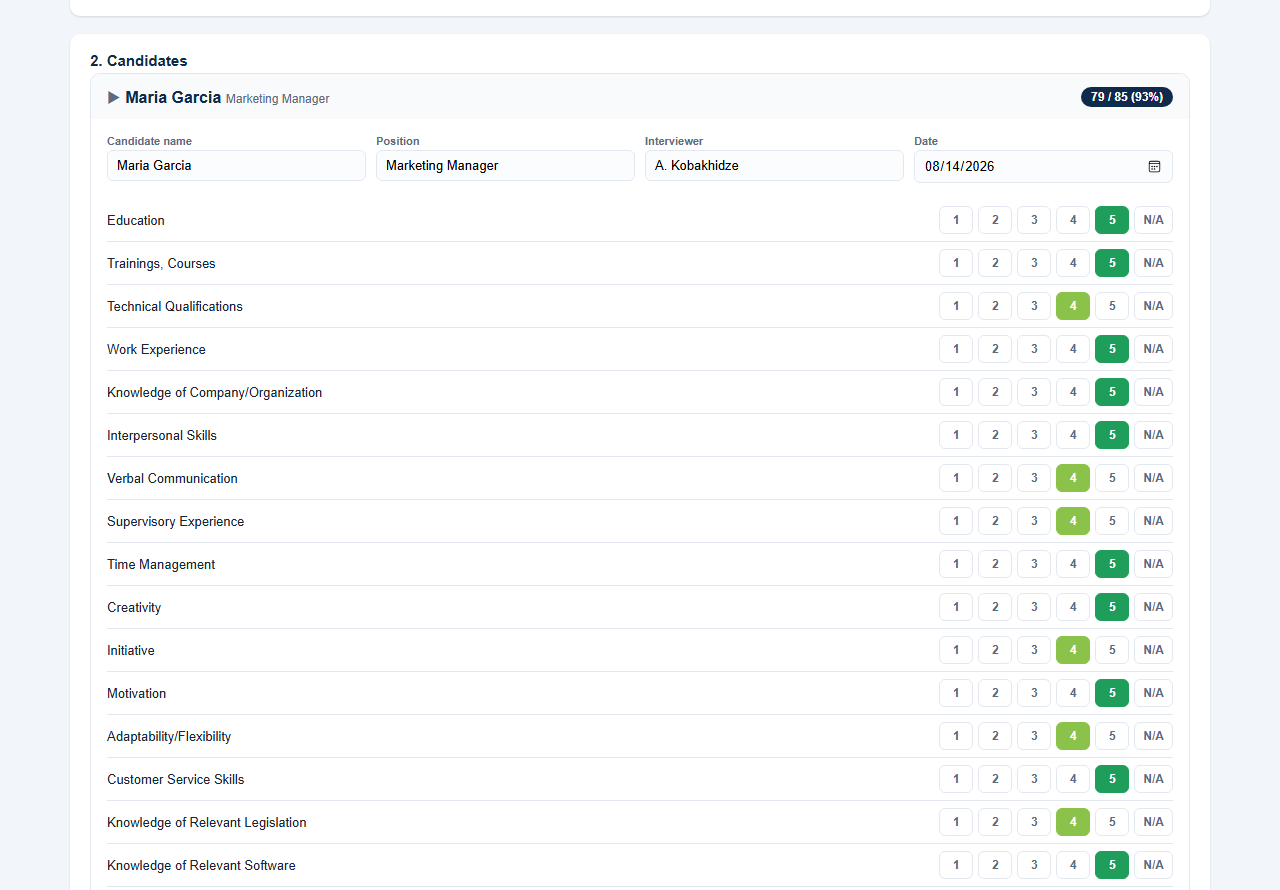
⭐ Simple click-to-rate scoring — a clean 1-5 (or N/A) button for every criterion. No tiny radio buttons, no zooming in on a spreadsheet.
⚖️ A fair percentage score — Not Applicable and not-yet-rated items are excluded from both the total and the maximum possible score, so candidates aren't unfairly penalized for questions that didn't apply to them.
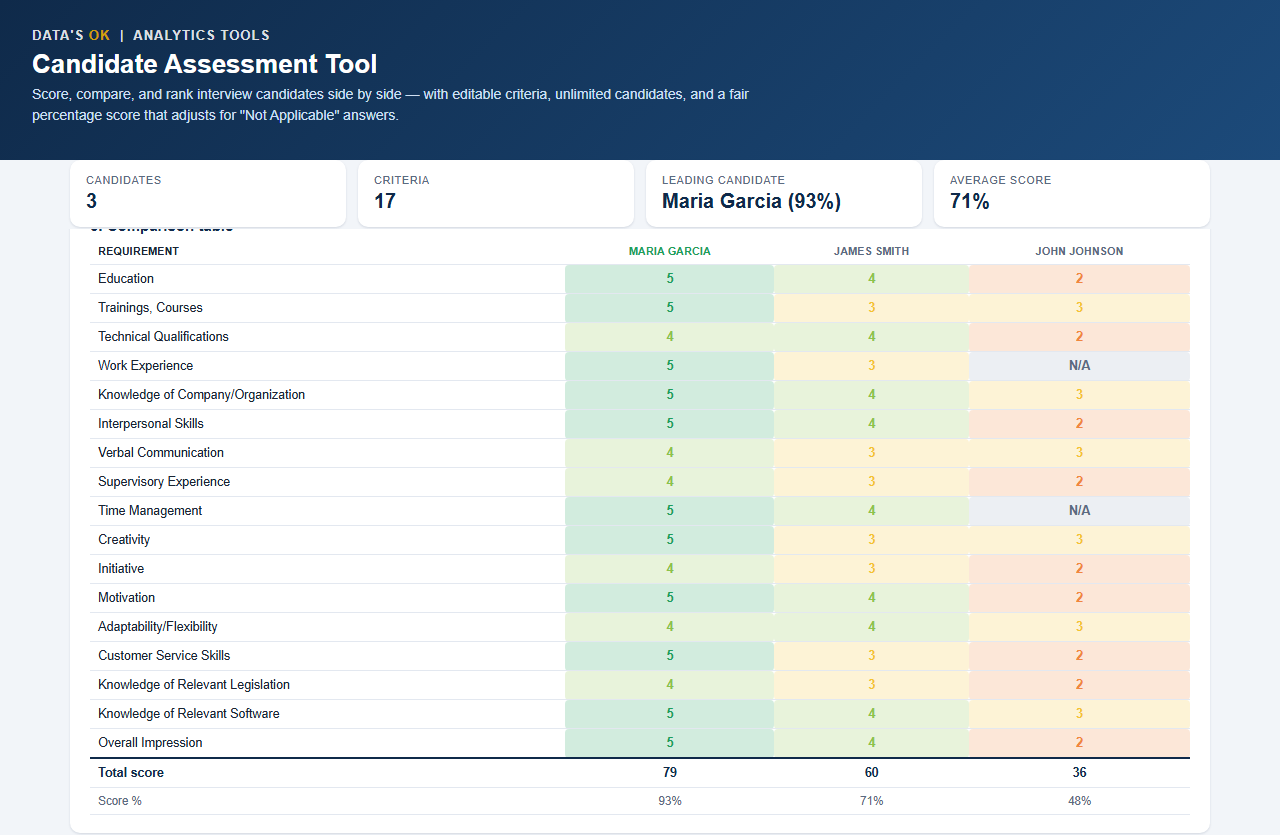
📊 Color-coded comparison table — every candidate's scores side by side, red-to-green coded, with the leading candidate automatically highlighted.
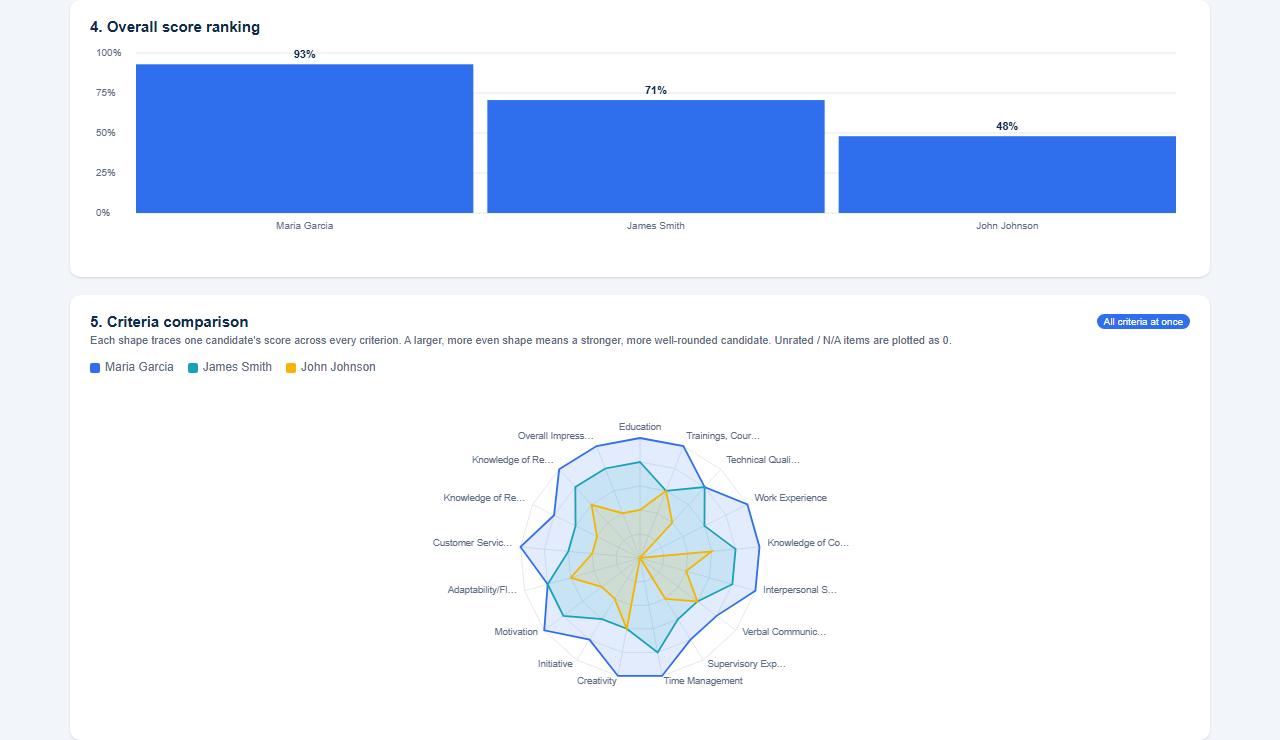
📈 Ranking chart — candidates ranked by score, highest first, at a glance.
🕸️ Radar chart — every candidate's full profile across every criterion in one shape, so you can instantly see a well-rounded candidate versus a narrow one.
🖨️ One-click printable report — a clean, professional one-page summary for any candidate, ready to share or file.
💾 Auto-saving + backup — your work saves automatically in your browser as you go; export a full backup (JSON) any time, or export the comparison table as CSV for your records.
📖 Included user manual — a plain-English walkthrough of every feature.
WHO IT'S FOR
→ HR specialists and hiring managers running structured interviews
→ Small teams without an ATS who need a clean way to compare candidates
→ Anyone hiring for a role where the criteria change every time
→ Panels interviewing more than a handful of candidates for one role
→ Recruiters who need a polished, shareable summary per candidate
WHY IT'S DIFFERENT
Template-based assessment forms make you fit your hiring process to the template. This tool fits the criteria to the role instead — edit the list once and it's reflected everywhere, for as many candidates as you need. The fair percentage score also means you can genuinely compare a candidate who was rated on all 17 criteria with one who had 3 marked "Not Applicable," on the same scale.No subscription. No software to install. No data uploaded anywhere — everything runs locally in your browser.
REQUIREMENTS
Any modern browser (Chrome, Edge, Firefox, Safari) on Windows, Mac, or Linux. No installation, no add-ins, no internet connection required after download.This Best Practice includes1 HTML file, 1 PDF user manual.
📋 Candidate Assessment Tool — Interactive HTML ToolBy Data'sOk
Score, compare, and rank interview candidates side by side — with unlimited candidates, criteria you fully control, and a fair score that doesn't penalize "Not Applicable" answers.Most candidate scorecards lock you into a fixed template: a set number of candidates, a fixed list of questions, and a "maximum score" that doesn't adjust when something doesn't apply. This tool doesn't have those limits. It's a single, self-contained HTML file — open it in any browser, on any device, and start scoring. No installation, no macros, nothing to enable.
WHAT YOU GET
A single interactive HTML file, fully unlocked:
📝 Fully editable criteria — start from the built-in 17 (Education, Technical Qualifications, Interpersonal Skills, and more), or add, remove, and rename to fit any role. Edit once, and it applies to every candidate automatically.
➕ Unlimited candidates — no cap. Add as many as you're actually interviewing, each with their own expandable card.
⭐ Simple click-to-rate scoring — a clean 1-5 (or N/A) button for every criterion. No tiny radio buttons, no zooming in on a spreadsheet.
⚖️ A fair percentage score — Not Applicable and not-yet-rated items are excluded from both the total and the maximum possible score, so candidates aren't unfairly penalized for questions that didn't apply to them.
📊 Color-coded comparison table — every candidate's scores side by side, red-to-green coded, with the leading candidate automatically highlighted.
📈 Ranking chart — candidates ranked by score, highest first, at a glance.
🕸️ Radar chart — every candidate's full profile across every criterion in one shape, so you can instantly see a well-rounded candidate versus a narrow one.
🖨️ One-click printable report — a clean, professional one-page summary for any candidate, ready to share or file.
💾 Auto-saving + backup — your work saves automatically in your browser as you go; export a full backup (JSON) any time, or export the comparison table as CSV for your records.
📖 Included user manual — a plain-English walkthrough of every feature.
WHO IT'S FOR
→ HR specialists and hiring managers running structured interviews
→ Small teams without an ATS who need a clean way to compare candidates
→ Anyone hiring for a role where the criteria change every time
→ Panels interviewing more than a handful of candidates for one role
→ Recruiters who need a polished, shareable summary per candidate
WHY IT'S DIFFERENT
Template-based assessment forms make you fit your hiring process to the template. This tool fits the criteria to the role instead — edit the list once and it's reflected everywhere, for as many candidates as you need. The fair percentage score also means you can genuinely compare a candidate who was rated on all 17 criteria with one who had 3 marked "Not Applicable," on the same scale.No subscription. No software to install. No data uploaded anywhere — everything runs locally in your browser.
REQUIREMENTS
Any modern browser (Chrome, Edge, Firefox, Safari) on Windows, Mac, or Linux. No installation, no add-ins, no internet connection required after download.This Best Practice includes1 HTML file, 1 PDF user manual.
This Best Practice includes
1 HTML file, 1 PDF file.
