










Digital Agency Management Excel Dashboard | CRM, Budgets, Campaigns, Retainers, Tasks, Team Capacity & KPIs

Agency management Excel system with CRM, budgets, campaigns, retainers, tasks, team capacity, profitability, KPI dashboard and onboarding bonus.

Description

✨ DIGITAL AGENCY COMMAND CENTER – AGENCY MANAGEMENT & OPERATIONS SYSTEM


Bring client management, project budgets, campaign performance, recurring retainers, delivery tasks, team capacity, profitability, and executive reporting into one structured agency operating system.


Designed for marketing agencies, creative studios, performance teams, consultants, freelancers, and service-based businesses, this professional Excel toolkit helps replace disconnected CRM files, campaign spreadsheets, budget trackers, task lists, time logs, and onboarding notes with a more consistent management workflow.


The package includes:

πŸ“Š 1 Digital Agency Command Center Excel Workbook 🎁 1 Agency Kickoff & Onboarding Mini Kit πŸ“˜ 1 detailed 12-page How-to-Use PDF Guide


The workbooks include realistic 2029 sample data, formula-driven calculations, dropdown-supported workflows, clear Manual Entry and Auto Formula areas, and professional navigation.


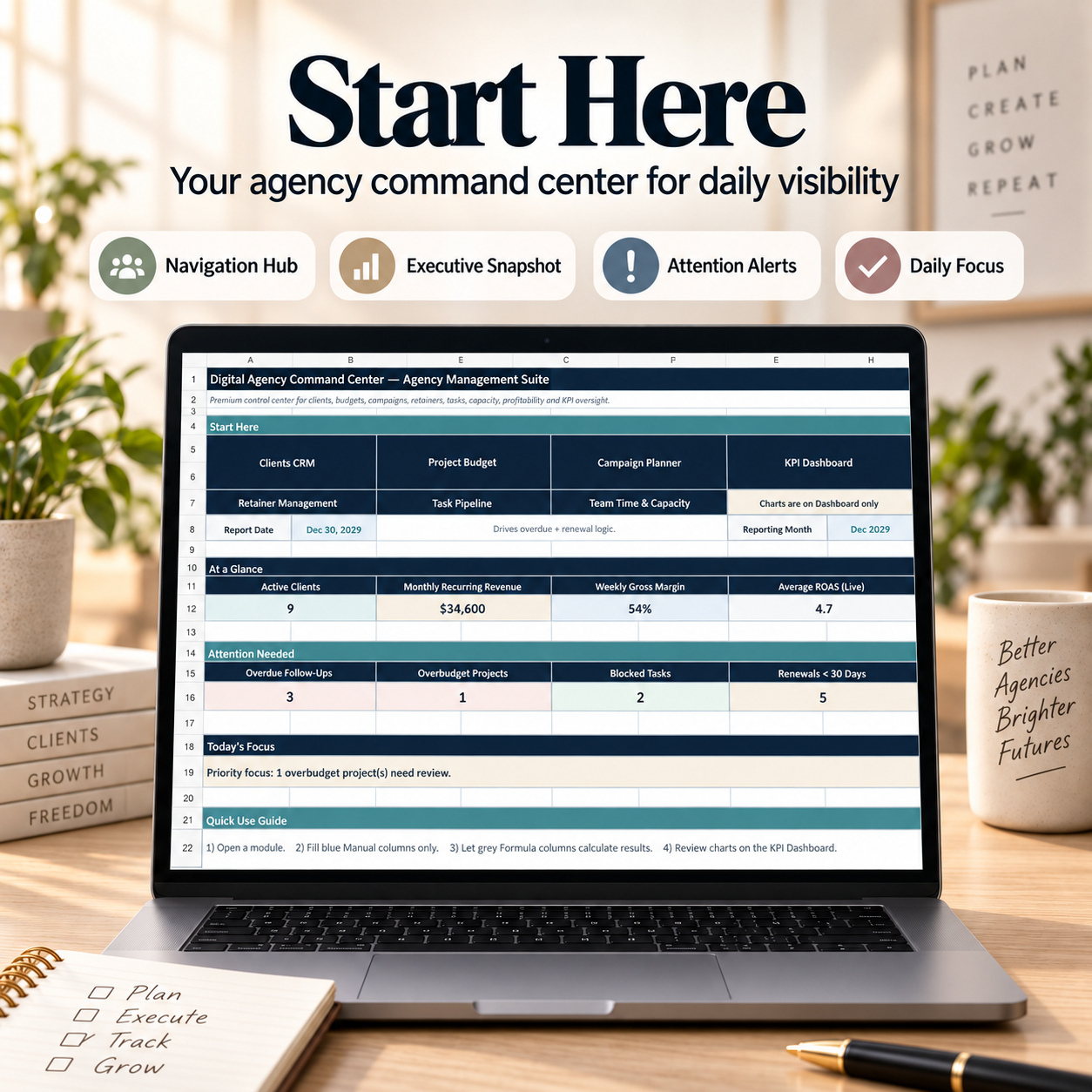
🏠 HOME / START COMMAND CENTER

The Home page provides a central entry point into the agency workflow and gives management an immediate operational snapshot.

Review:

βœ… Active Clients βœ… Monthly Recurring Revenue βœ… Weekly Gross Margin βœ… Average ROAS βœ… Overdue Follow-Ups βœ… Overbudget Projects βœ… Blocked Tasks βœ… Retainers Approaching Renewal


A configurable Report Date drives timing-based logic including overdue follow-ups, renewal alerts, and other attention indicators.


The page also generates a concise Today’s Focus message based on current operational conditions, helping teams identify which area requires attention before moving into the detailed trackers.


πŸ‘₯ CLIENTS CRM

Maintain a structured client database covering the key commercial and relationship information required for day-to-day account management.

Track:

βœ… Client ID βœ… Client Name βœ… Industry βœ… Segment βœ… Lead Source βœ… Client Status βœ… Account Manager βœ… Contact Information βœ… Last Contact βœ… Next Follow-Up βœ… Monthly Retainer


Automatic outputs include:

πŸ“Š Active Projects πŸ’° Estimated Lifetime Value ⏳ Days Since Last Contact πŸ“… Follow-Up In ⚠️ Risk Score 🚦 Risk Level


This provides a centralized client-reference layer while also helping identify relationships that may require management attention.

Consistent Client IDs are used across the workbook to support cleaner connections between client, project, campaign, task, and time records.


πŸ’° PROJECT BUDGET TRACKER

Manage project-level financial control without mixing delivery budgets with campaign reporting or recurring retainers.


Track:

βœ… Client βœ… Project ID βœ… Project Name βœ… Start Date βœ… End Date βœ… Approved Budget βœ… Cost to Date βœ… Project Status βœ… Notes


Formula-driven outputs calculate:

πŸ’΅ Remaining Budget πŸ“Š % Spent πŸ“ˆ Estimated Margin %


This makes it easier to review project delivery and commercial health together.

A project can still be technically under budget while approaching delivery or margin pressure, so the tracker is designed to support both numeric and status-based management review.


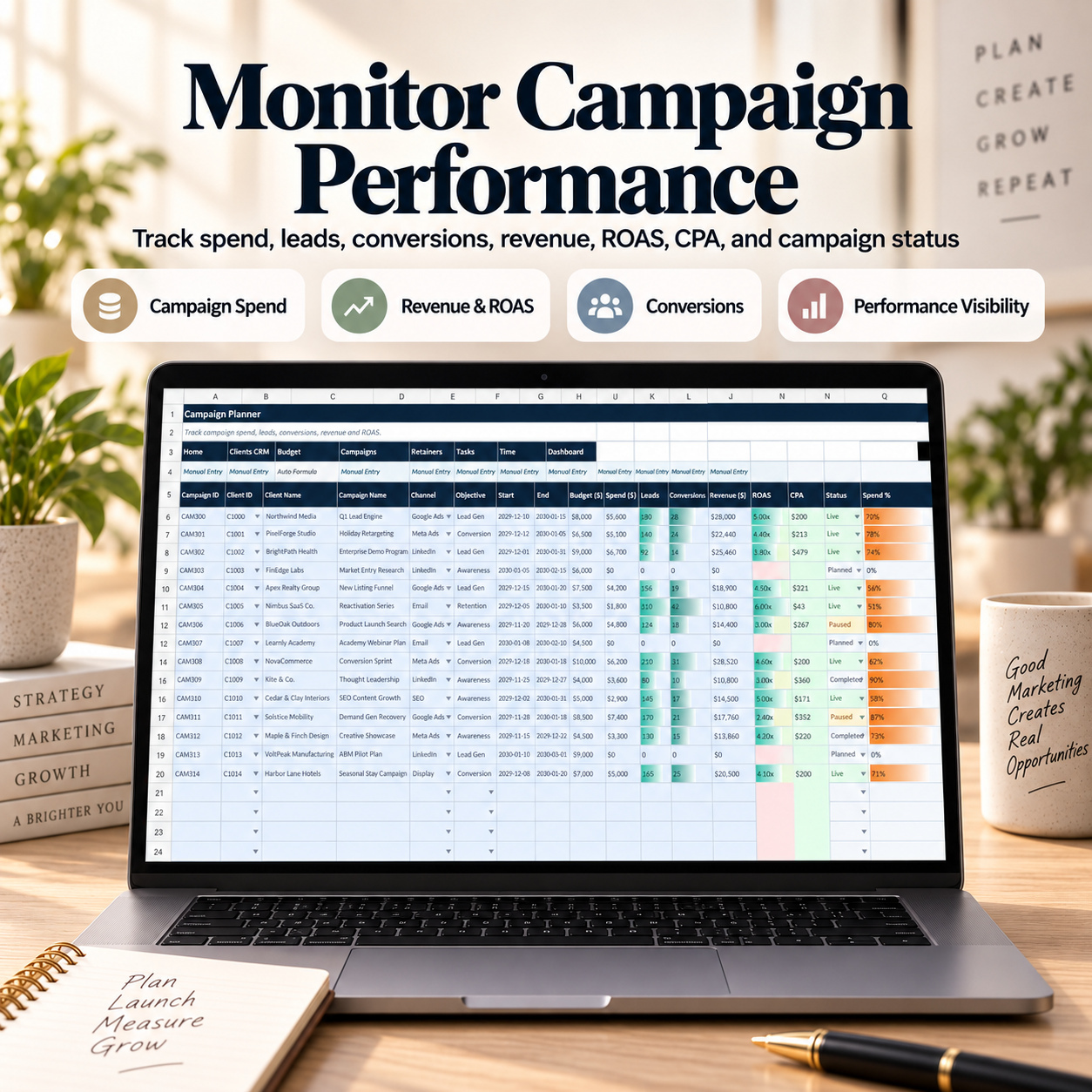
πŸ“£ CAMPAIGN PLANNER

Track paid, organic, performance, and lead-generation campaigns through a consistent commercial reporting structure.


Capture:

βœ… Campaign ID βœ… Client βœ… Campaign Name βœ… Channel βœ… Objective βœ… Start & End Dates βœ… Budget βœ… Spend βœ… Leads βœ… Conversions βœ… Revenue βœ… Status


Automatic calculations include:

πŸ“ˆ ROAS πŸ’° CPA πŸ“Š Spend %


This provides a transparent comparison between budget usage and campaign outcomes using the organization’s own attribution method.


The workbook does not connect automatically to advertising platforms; campaign results are entered from the user’s own reporting sources.


πŸ” RETAINER MANAGEMENT

Manage recurring service agreements and compare commercial value with delivery effort.


Track:

βœ… Client βœ… Service Package βœ… Billing Cycle βœ… Monthly Fee βœ… Included Hours βœ… Start Date βœ… Renewal Date βœ… Invoice Status


Formula-driven management indicators include:

⏱️ Hours Used MTD

⏳ Hours Remaining πŸ“Š Utilization πŸ’Ž Estimated Gross Margin % πŸ“… Days to Renewal 🚦 Billing Health

This gives agency leaders visibility into both recurring revenue and delivery pressure.

Retainer accounts can therefore be reviewed not only by fee value, but also by utilization, profitability, renewal timing, and billing condition.


βœ… TASK PIPELINE

Coordinate client and internal work through one consistent execution tracker.

Manage:

βœ… Task ID βœ… Client βœ… Project βœ… Task Description βœ… Work Type βœ… Owner βœ… Priority βœ… Status βœ… Created Date βœ… Due Date βœ… Estimated Hours βœ… Actual Hours βœ… Notes


Automatic outputs calculate:


πŸ“Š Actual / Estimated Hours ⏳ Days to Due

This makes it easier to identify blocked work, upcoming deadlines, and tasks consuming more effort than originally planned.

The structured status and priority system also feeds executive reporting.


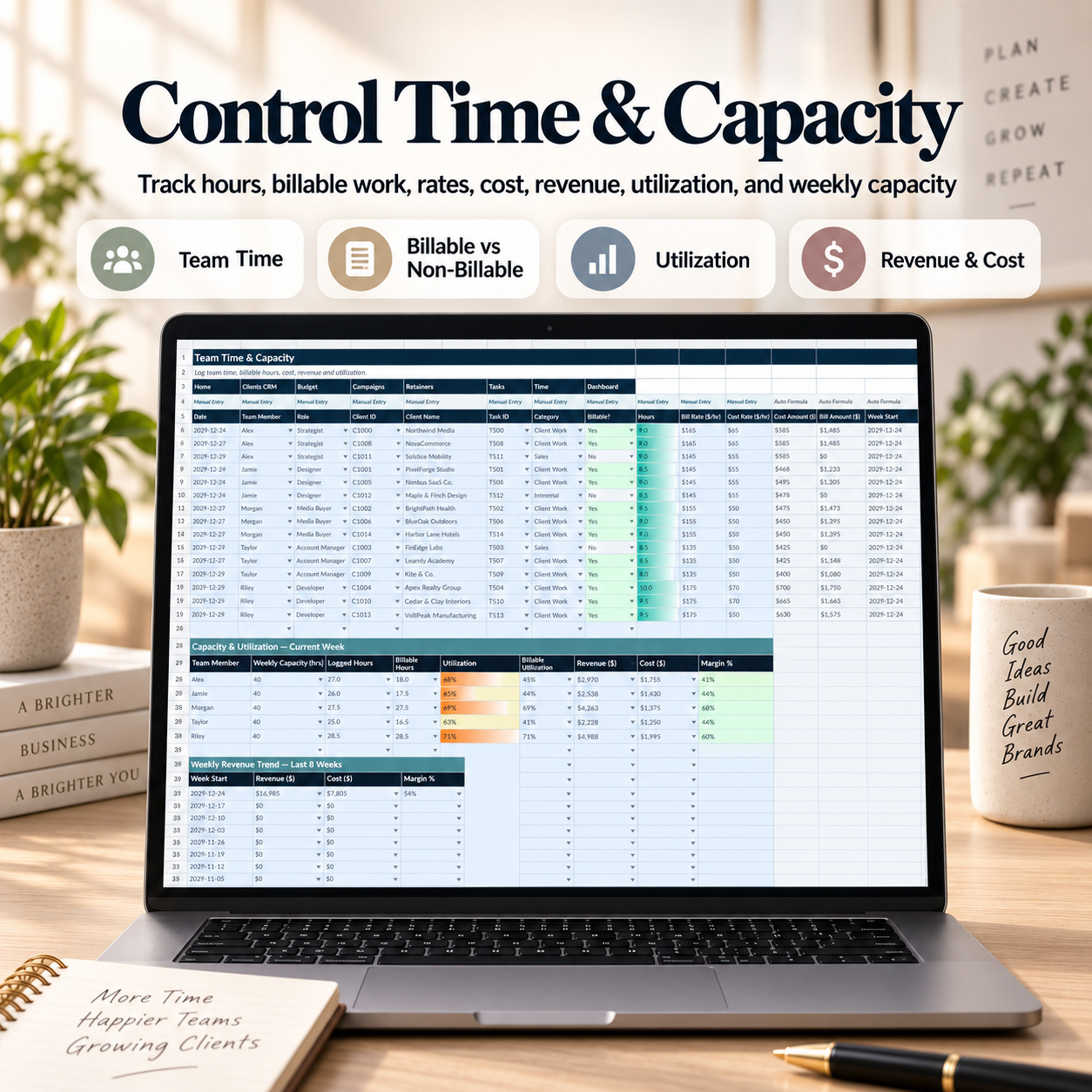
⏱️ TEAM TIME & CAPACITY

Track how team effort translates into internal cost, billable value, and capacity.

Log:

βœ… Date βœ… Team Member βœ… Role βœ… Client βœ… Task βœ… Work Category βœ… Billable / Non-Billable Status βœ… Hours βœ… Bill Rate βœ… Cost Rate


Automatic calculations provide:

πŸ’Έ Cost Amount πŸ’° Bill Amount πŸ“… Week Start


These records support the agency’s weekly utilization, revenue, and gross-margin calculations.


This creates a clearer connection between commercial commitments and actual delivery effort, particularly for retainer-based and multi-client agency environments.


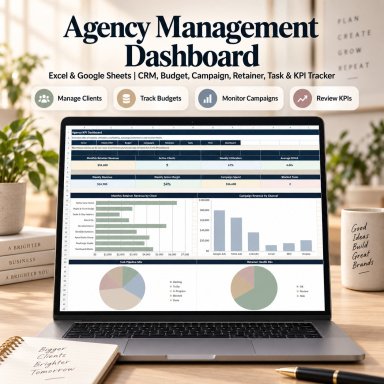
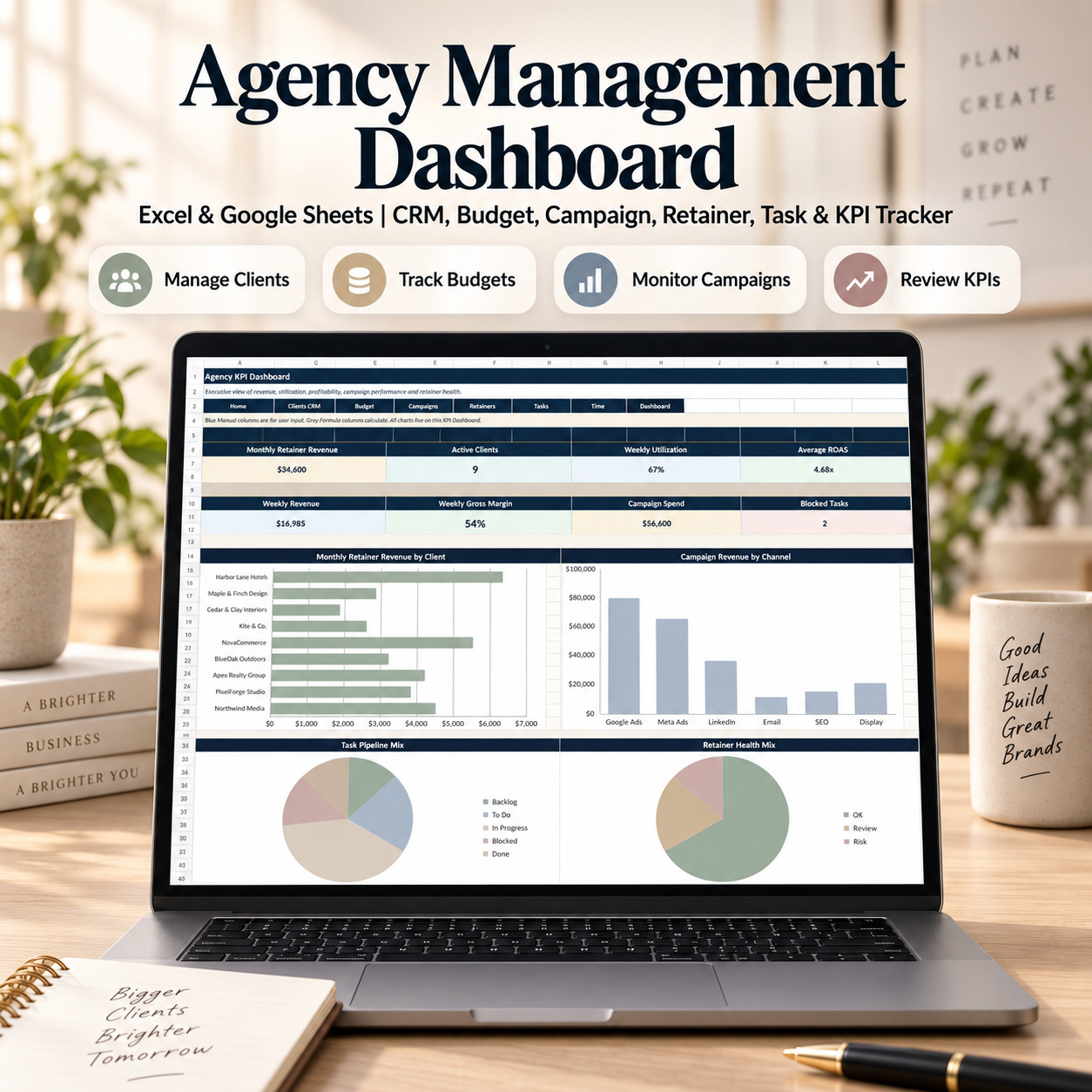
πŸ“Š EXECUTIVE KPI DASHBOARD

The dedicated KPI Dashboard consolidates agency performance into 8 headline KPIs:

πŸ’° Monthly Retainer Revenue πŸ‘₯ Active Clients ⏱️ Weekly Utilization πŸ“ˆ Average ROAS πŸ’΅ Weekly Revenue πŸ’Ž Weekly Gross Margin πŸ“£ Campaign Spend 🚨 Blocked Tasks


Four Excel-native charts provide an additional management view:

πŸ“Š Monthly Retainer Revenue by Client πŸ“ˆ Campaign Revenue by Channel βœ… Task Pipeline Mix πŸ” Retainer Health Mix


The dashboard is designed as an executive interpretation layer. The source trackers remain the operational record, while the dashboard helps management identify patterns, concentration, delivery risk, and areas requiring follow-up.


🎁 AGENCY KICKOFF & ONBOARDING MINI KIT

The included bonus workbook provides a focused pre-delivery workflow for new clients.

It contains 4 worksheets:

🧭 Start πŸ“ Kickoff Briefs πŸ” Assets & Access πŸ—’οΈ Meeting Notes

Rather than duplicating the main agency tracker, this workbook focuses specifically on the transition from signed client to operational readiness.


πŸ“ KICKOFF BRIEFS

Capture critical onboarding information including:

βœ… Client βœ… Industry βœ… Project Type βœ… Offer / Scope βœ… Objective βœ… Primary Channel βœ… Launch Date βœ… Budget βœ… KPI Target βœ… Owner βœ… Status βœ… Priority βœ… Notes


Automatic calculations provide:

πŸ“Š Completeness % βœ… Ready to Build? ⚠️ Missing Inputs


This gives account or project owners a structured way to determine whether the client brief contains the required information before delivery begins.


πŸ” ASSETS & ACCESS

Track onboarding requirements without storing sensitive login credentials.

Manage:

βœ… Asset Type βœ… Asset / Access Item βœ… Owner βœ… Requested Date βœ… Due Date βœ… Critical? βœ… Received? βœ… Approval Needed? βœ… Link / Notes


Automatic outputs include:

🚦 Status ⏳ Days to Due ➑️ Next Action


Examples can include analytics access, advertising accounts, brand assets, creative files, CRM access, website permissions, legal approvals, or other required materials.


πŸ“Œ The tracker is specifically designed for requests, permission status, approvals, and links. It should not be used to store passwords, recovery codes, or sensitive credentials.


πŸ—’οΈ MEETING NOTES & ACTION LOG

Convert client meetings into clear decisions and accountable follow-up.

Track:

βœ… Meeting Date βœ… Client βœ… Meeting Type βœ… Attendees βœ… Summary βœ… Decisions βœ… Action Item βœ… Owner βœ… Due Date βœ… Status βœ… Priority βœ… Notes


Automatic logic calculates:

⏳ Days Overdue πŸ“… Follow-up This Week?

This creates a more consistent transition from meetings and discussions into owned actions.


πŸ“Š ONBOARDING START DASHBOARD

The bonus Start page consolidates onboarding status into a compact management view.

Review:

βœ… Briefs Approved βœ… Ready to Build βœ… Assets Received % βœ… Open Actions βœ… Overdue Actions βœ… Critical Missing Assets βœ… Items Due in the Next 7 Days βœ… Overall Onboarding Completion


A Today’s Focus area surfaces the highest-priority onboarding issue according to the current data and Report Date.

The recommended onboarding flow is:

Kickoff Brief β†’ Assets & Access β†’ Meeting Actions β†’ Review Start

This provides a repeatable process from first client handoff to delivery readiness.


πŸ“˜ 12-PAGE HOW-TO-USE GUIDE

The included professional guide covers:

βœ… Quick Start βœ… Bundle Structure βœ… Main Tracker Workflow βœ… Manual Entry vs. Auto Formula Logic βœ… Dropdown Usage βœ… Safe Workbook Extension βœ… KPI Dashboard Interpretation βœ… Clients CRM βœ… Project Budget βœ… Campaign Planner βœ… Retainer Management βœ… Task Pipeline βœ… Team Time & Capacity βœ… Agency Kickoff Mini Kit βœ… Onboarding Workflow βœ… Recommended Daily / Weekly / Monthly Operating Rhythm βœ… Excel & Google Sheets Compatibility βœ… Troubleshooting βœ… Reset Guidance βœ… Legal & Responsible Use


The guide also provides a recommended agency operating cadence:

πŸ“… Daily: review urgent actions, follow-ups and blocked work πŸ“… Weekly: refresh campaigns, budgets, retainers, time and onboarding blockers πŸ“… Monthly: review KPI trends, client risk, margins and stale records


πŸ’» TECHNICAL COMPATIBILITY

βœ… Microsoft Excel (.xlsx) βœ… Google Sheets import supported βœ… No macros or VBA βœ… No APIs βœ… No live CRM or advertising integrations βœ… No external Excel data connections βœ… Formula-driven calculations βœ… Dropdown-supported data entry βœ… Manual Entry / Auto Formula guidance βœ… Realistic 2029 sample data


πŸ“Œ Microsoft Excel Desktop remains the reference environment for the intended formatting, formulas, and chart presentation.

The .xlsx files can also be imported into Google Sheets. Minor differences in fonts, row heights, spacing, dropdown display, conditional formatting, or chart sizing may occur after import.


βš–οΈ IMPORTANT DISCLAIMER

This toolkit is provided for organizational, planning, and internal management purposes only. It does not constitute financial, tax, accounting, legal, marketing-performance, or professional business advice.

All revenue, margin, ROAS, utilization, budget, and other outputs depend on the data entered by the user and should be reviewed for the organization’s own circumstances.


πŸ“Š This complete agency operating system brings client management, project economics, campaign performance, recurring revenue, delivery workload, team capacity, profitability, and onboarding into one coordinated workflow.

It is designed to help agency owners, managers, consultants, and service teams create clearer operational visibility, stronger follow-up discipline, and a more consistent connection between client commitments, delivery effort, and commercial performance.

This Best Practice includes
1 Main Excel Workbook (.xlsx), Agency Kickoff & Onboarding Mini Kit (.xlsx), How-to-Use Guide (.pdf) β€” 12 pages

Acquire business license for $39.90

Add to cart

Add to bookmarks

Discuss

Further information

The objective of this Digital Agency Command Center is to provide agency owners, operations leaders, consultants, and service teams with a structured framework for coordinating client relationships, delivery commitments, commercial performance, and team capacity.

Users can maintain client records and follow-ups, monitor project budgets, track campaign performance, manage retainers and renewals, coordinate tasks, record billable and non-billable time, and review agency-level KPIs within one connected system.

The accompanying onboarding workbook extends the process to the beginning of the client lifecycle by helping teams document scope, readiness, access requirements, decisions, actions, and blockers before delivery begins.

The overall objective is to improve operational visibility, ownership, commercial awareness, follow-up discipline, and management reporting without requiring a complex agency-management platform.

This system is particularly suitable for:

Marketing agencies
Digital agencies
Creative studios
Branding agencies
Performance marketing teams
SEO agencies
Paid media agencies
CRO teams
Freelancers managing multiple clients
Retainer-based service businesses
Agency operations managers
Account managers
Consultants
Small and growing service teams

It is especially useful when client records, project budgets, campaign results, retainers, tasks, time logs, and onboarding information are currently distributed across multiple spreadsheets or documents.

This system does not replace full CRM platforms, project-management software, accounting systems, payroll systems, time-tracking applications, advertising-platform reporting, ERP systems, or dedicated agency-management software where live integrations are required.

It does not include APIs, automatic ad-platform synchronization, CRM integrations, invoicing automation, bank feeds, accounting connections, password management, or live external data.

The template is intended for internal management and organizational use. Users remain responsible for validating their own commercial inputs, reporting methods, financial assumptions, client data, and business decisions.


0.0 / 5 (0 votes)

please wait...