
Depreciation/Amortisation Excel Calculator
Originally published: 27/05/2019 06:42
Last version published: 06/05/2026 18:54
Publication number: ELQ-35061-5
View all versions & Certificate
certified

Depreciation/Amortisation Excel Calculator

Tool to calculate Depreciation/amortisation using straight-line method on asset by asset basis including projections.

Description
MODEL OVERVIEW

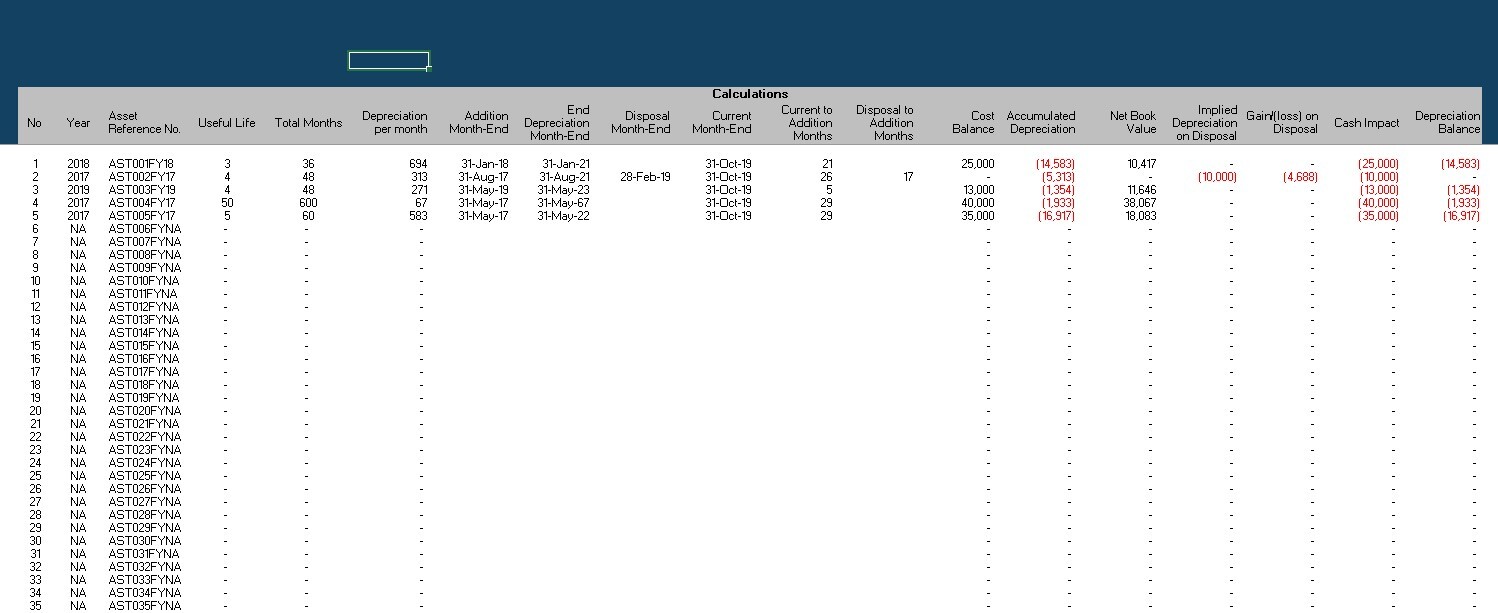
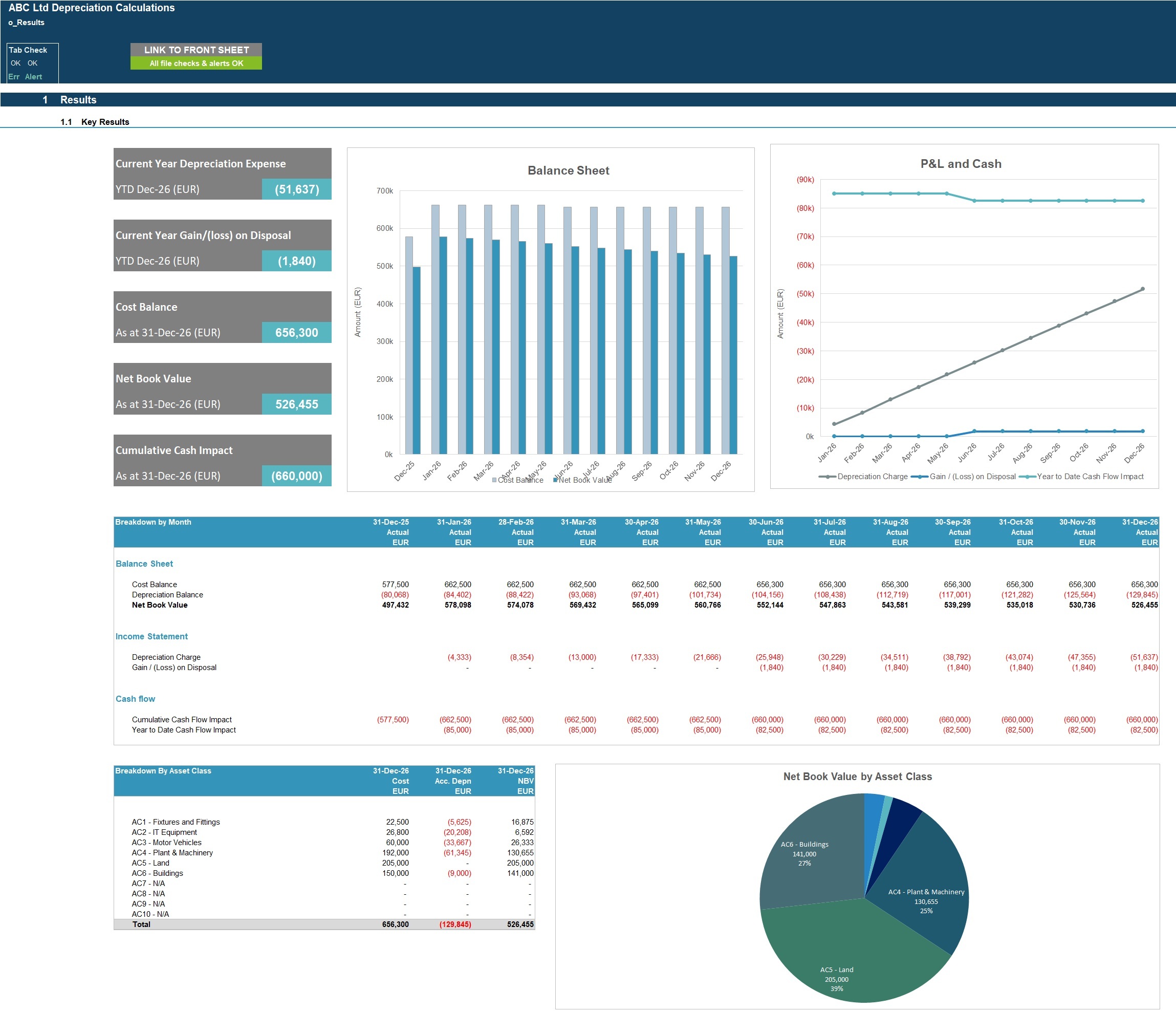
User-friendly Excel tool to calculate depreciation/amortisation charges on a straight line basis together with related cost and accumulated depreciation balances, cash impacts and gains/losses on disposal for any month-end. This tool helps to automate the deprecation accounting calculations and intended as a supporting working file for the General Ledger depreciation postings.

The tool follows good practice financial modelling principles and includes instructions, line item explanations, checks and input validations.

KEY OUTPUTS

The tool is generic and not industry-specific. The key outputs include:
- Year to date (‘YTD’) depreciation expense the selected month-end;
- YTD gain/loss on disposal;
- Cost and Accumulated Depreciation balances for the selected month-end;
- Cumulative cash impact;
- Chart showing the development of depreciation year;
- Chart showing Cost vs Net Book Value balances expected across the financial year.- Asset class breakdown in table and chart format


KEY INPUTS

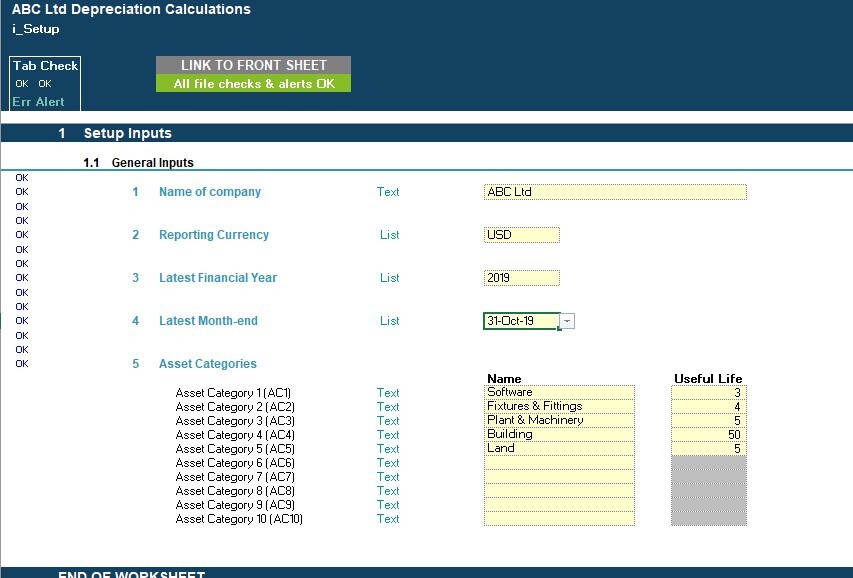
Setup Inputs:
- Name of business
- Currency
- Financial Year
- Latest month-end
- Asset categories (up to 10 naming categories)
- Useful Life per asset category

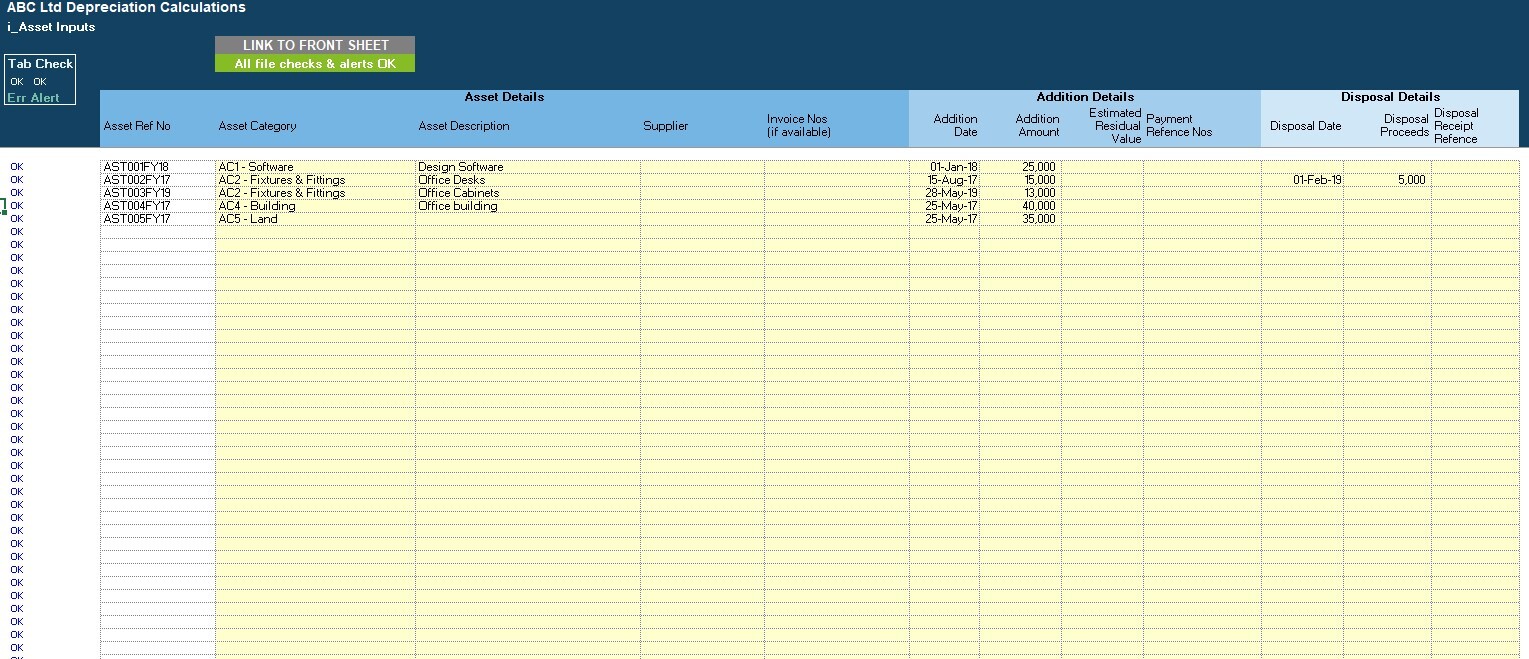
Asset inputs (for each asset with a current maximum of 150 asset items):
- Asset category classification
- Asset description
- Supplier
- Invoice number
- Addition Date
- Addition Amount
- Estimated Residual Value
- Payment Reference No.
- Disposal Date (if applicable)
- Disposal Proceeds (if applicable)
- Disposal Receipt Reference (if applicable)

MODEL STRUCTURE

The tool contains, 5 tabs split into input ('i_'), output ('o_’) and system tabs. The tabs to be populated by the user are the input tabs ('i_Setup' and ‘i_Asset Inputs’). The output (‘o_Results’) tab uses the user-defined inputs to calculate and produce and present the calculation outputs and charts (see ‘KEY OUTPUTS’).

KEY FEATURES

- The tool follows good practice financial modelling guidelines and includes instructions, line item explanations, checks and input validations;
- The tool calculates depreciation on a straight-line basis only
- The tool does not have the functionality to allow assets to be input in multiple currencies
- The tool allows assets to be classified into 1 of 10 asset categories that can be set by the user and each of which will have their own useful life.
- The tool uses ‘data tables’ to generate projected cost and depreciation balances, depreciation charges, cash impacts and gain/loss on disposal for months other than the current month-end to allow the user to understand the impact for the full year.
- The tool allows for a maximum of 150 asset items (this can be extended if required).
- Business Name, currency, financial year and asset categories are fully customisable
- The tool includes instructions, line item explanations, checks and input validations to help ensure input fields are populated accurately;
- The tool includes a checks dashboard which summarises all the checks included in the various tabs making it easier to identify any errors.

SUPPORT / MODIFICATIONS


We are keen to ensure our customers are satisfied and find the models useful for their financial projection needs. Our models are developed with the user in mind and include instructions, line-item explanations, checks and input validations to ensure they are as user-friendly and easy to use as possible without requiring extensive knowledge of Microsoft Excel, finance or accounting. If any questions do arise, we are more than happy to assist. We are also happy to support with any be-spoke modifications you may require to the models to better suit your business needs. To get in touch, please send us a message through the website or contact us on: [email protected]


We are also always keen to receive feedback so please do let us know what you think of our models by sending us a message or submitting a review.


ABOUT PROJECTIFY


We are financial modelling professionals with experience working in big 4 business modelling teams and strong experience supporting businesses with their financial modelling and decision support needs. Our aim is to provide robust and easy-to-use tools that follow good practice financial modelling guidelines and assist individuals and businesses with their financial projection and analysis requirements.

This Best Practice includes
1 Populated Excel Model and 1 Unpopulated Excel Model

Acquire business license for $25.00

Add to cart

Add to bookmarks

Discuss

Further information

- Automate depreciation & amortisation calculations - Accurately compute expense, accumulated depreciation, and net book value with minimal manual effort.
- Support financial reporting & compliance - Provide reliable outputs for month-end, general ledger postings, and audit-ready reporting.
- Improve visibility & decision-making - Track asset values, movements, and disposals to support better financial planning and analysis.


4.5 / 5 (6 votes)

please wait...