

Originally published: 21/05/2024 07:44
Last version published: 08/01/2026 16:57
Publication number: ELQ-76263-5
View all versions & Certificate
Last version published: 08/01/2026 16:57
Publication number: ELQ-76263-5
View all versions & Certificate

Indoor Golf Centre Finance Model 5 Year 3 Statement
A comprehensive editable, MS Excel model for tracking Indoor Golf Centre finances, including yearly Online and Offline Opportunities and development.
 by AllFinancialModels
AllFinancialModels offer a curated selection of high-quality yet financial model templates designed to support a wide range of business needs.Follow
Description
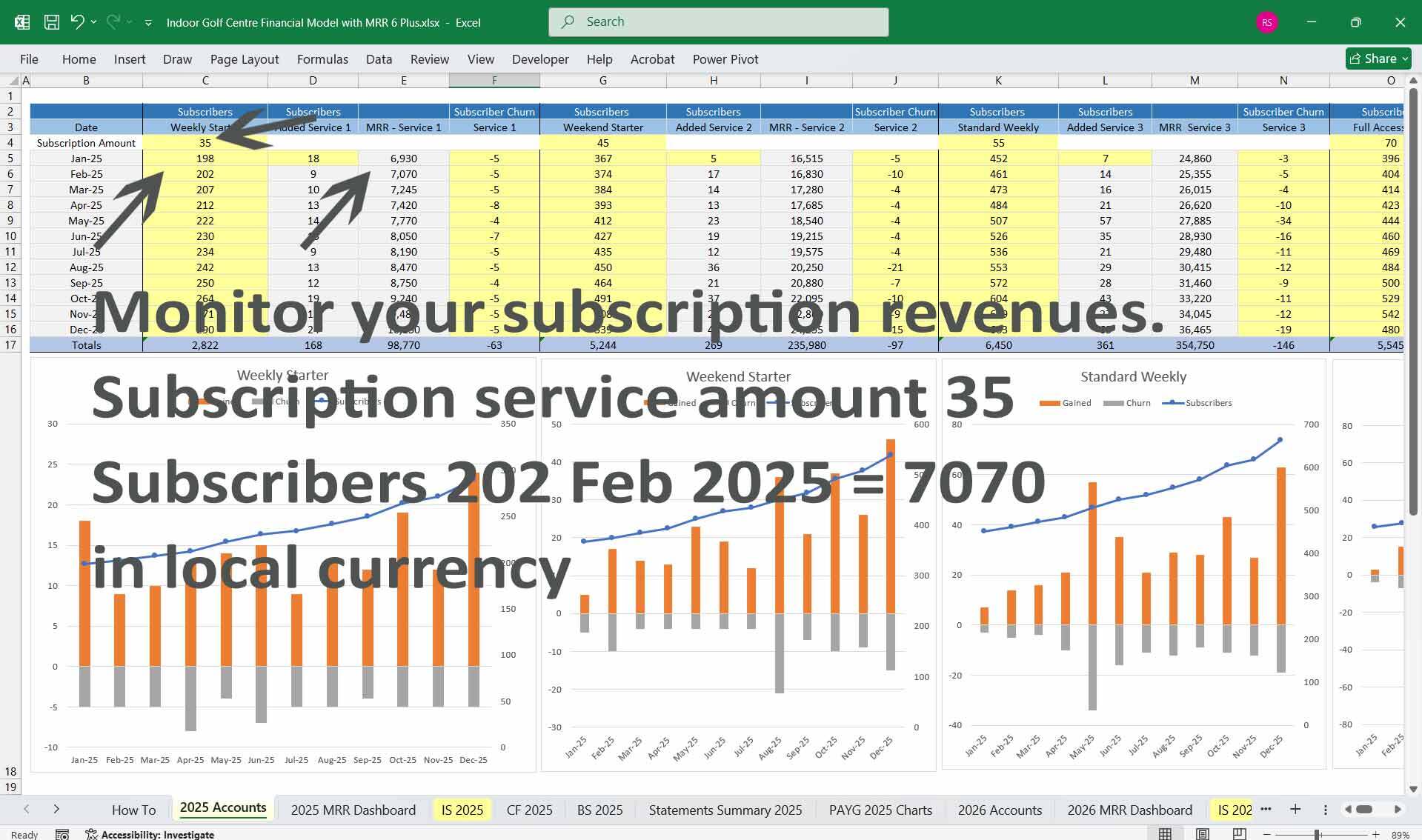
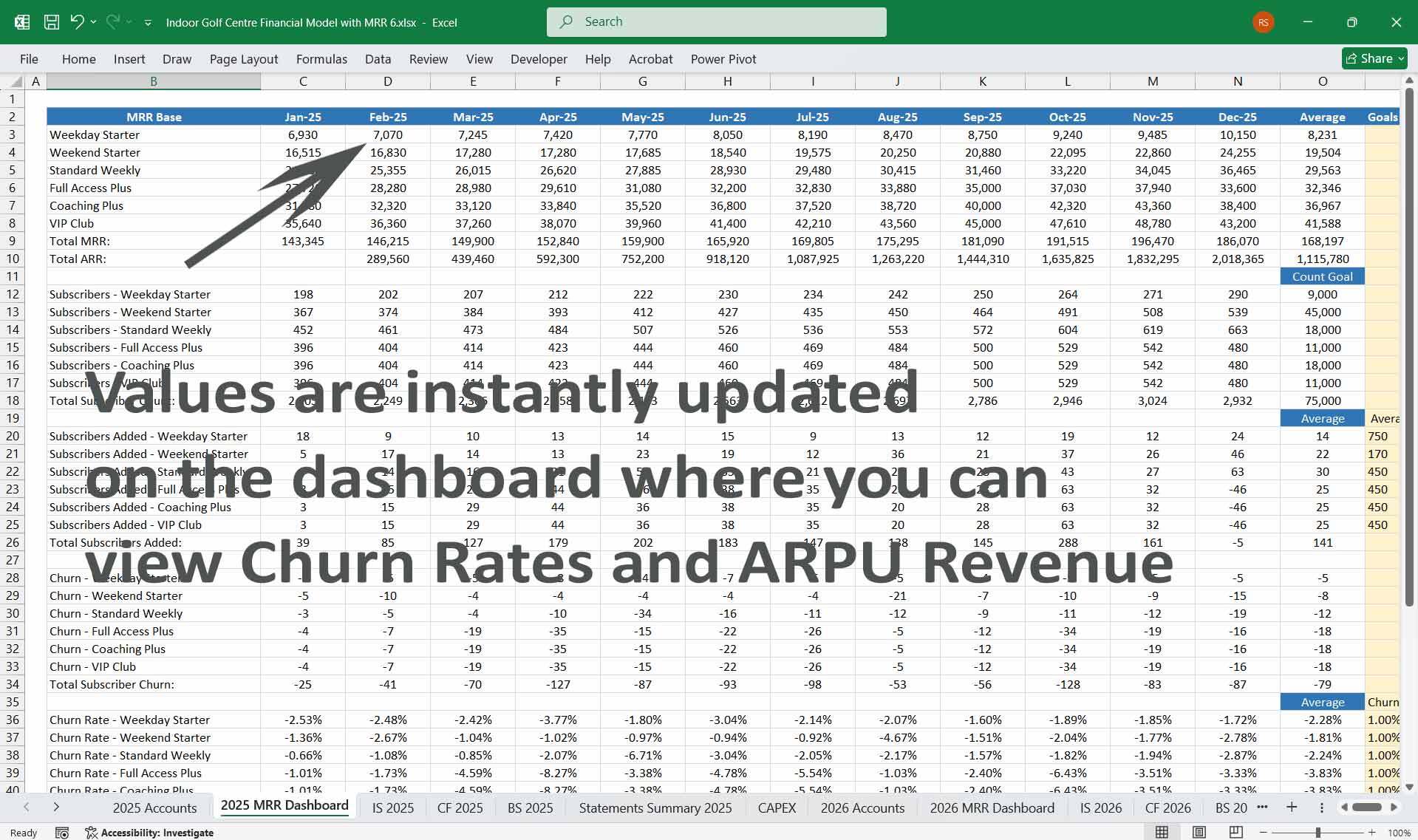
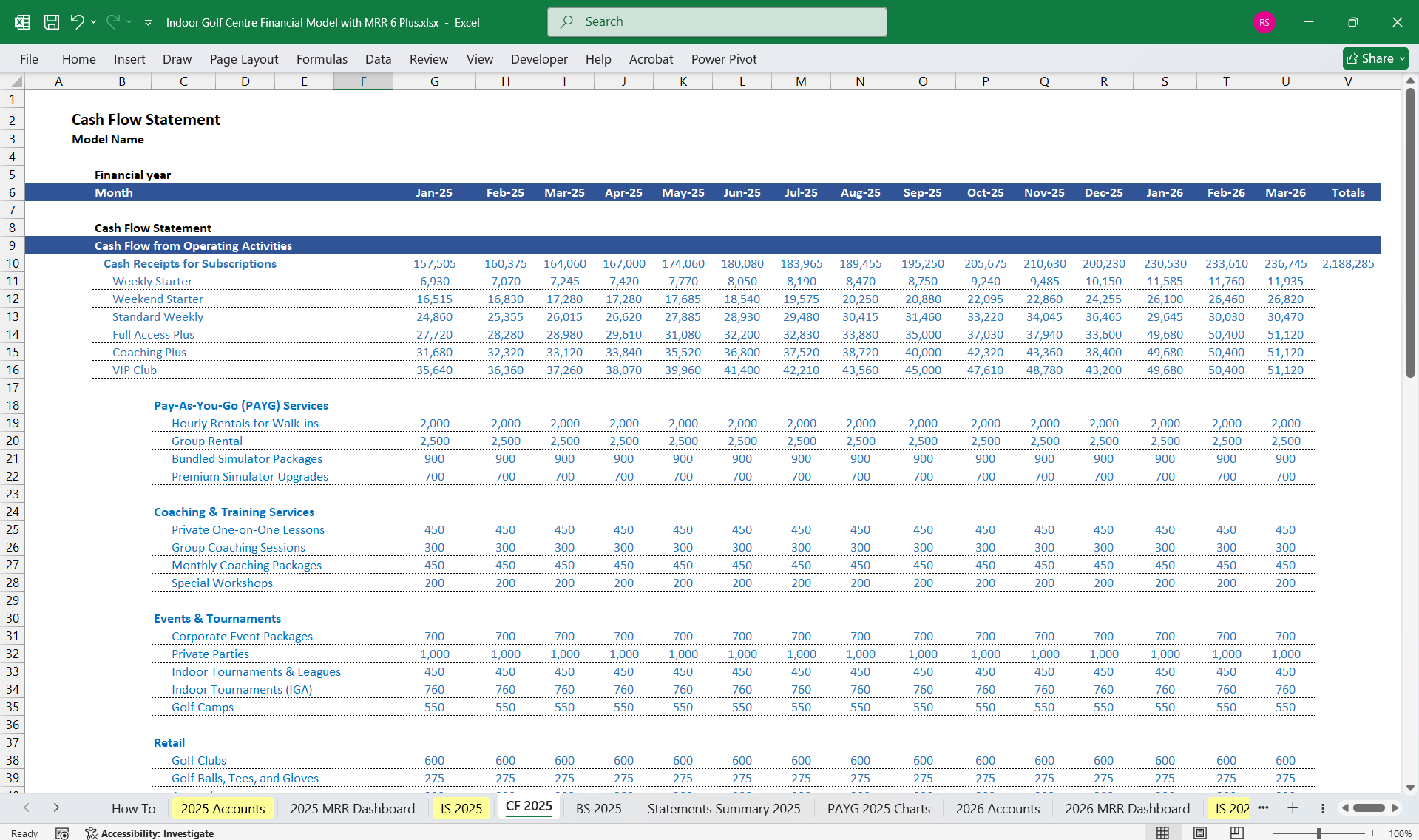
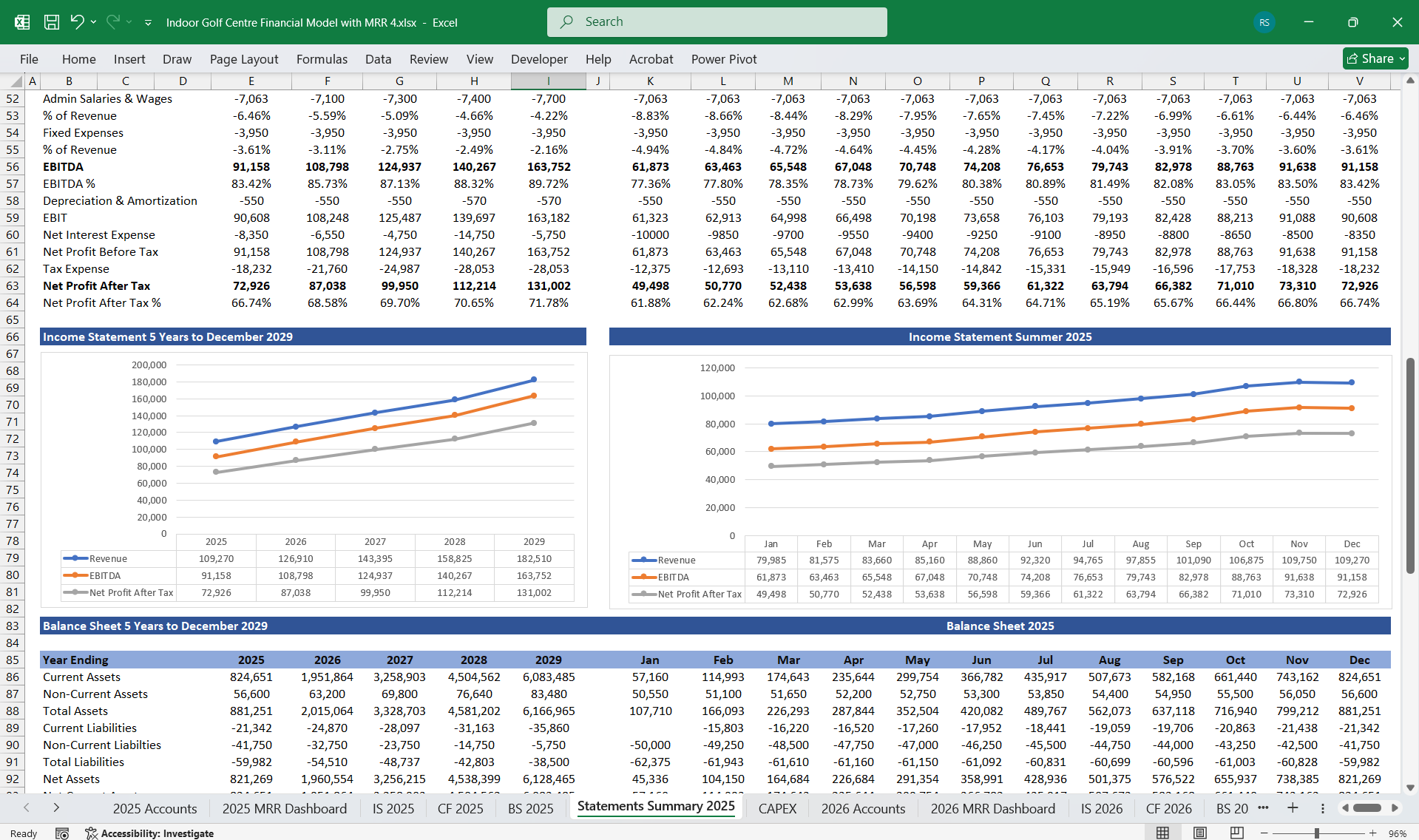
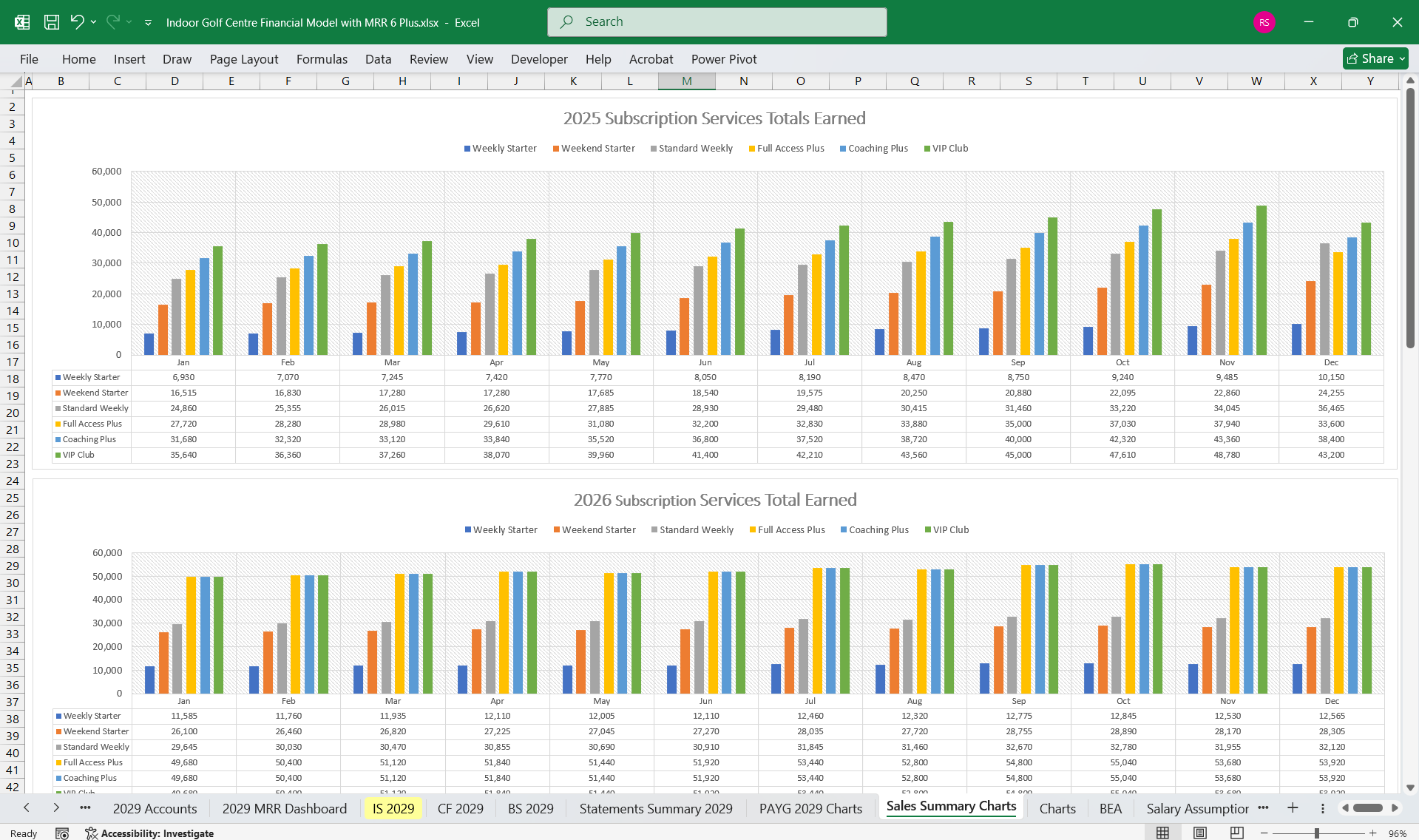
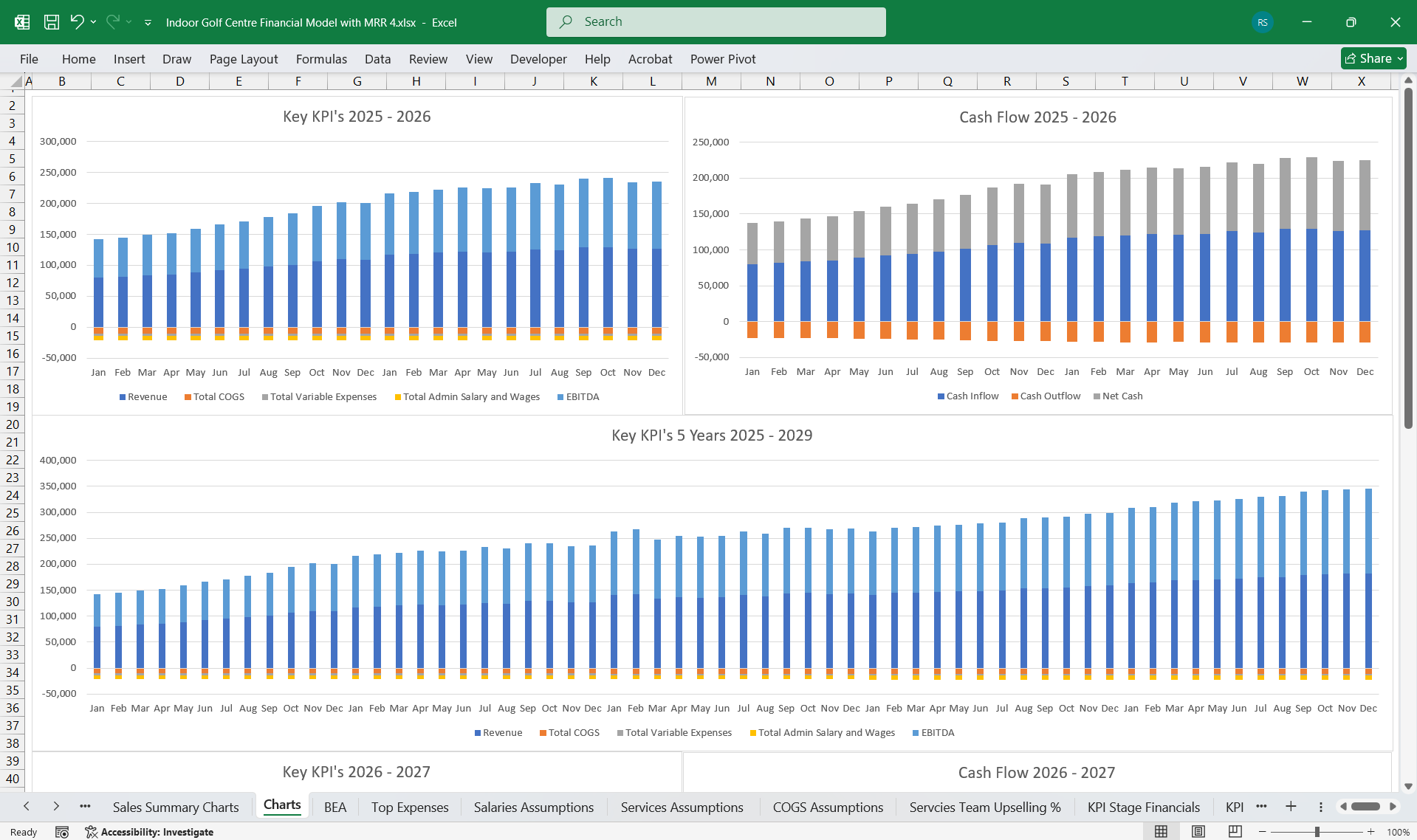
Here’s a detailed financial model for an Indoor Golf Centre. It includes key financial sections such as Income Statement, Cash Flow Statement, and Balance Sheet, along with a detailed breakdown of the 6-Tier subscription model.
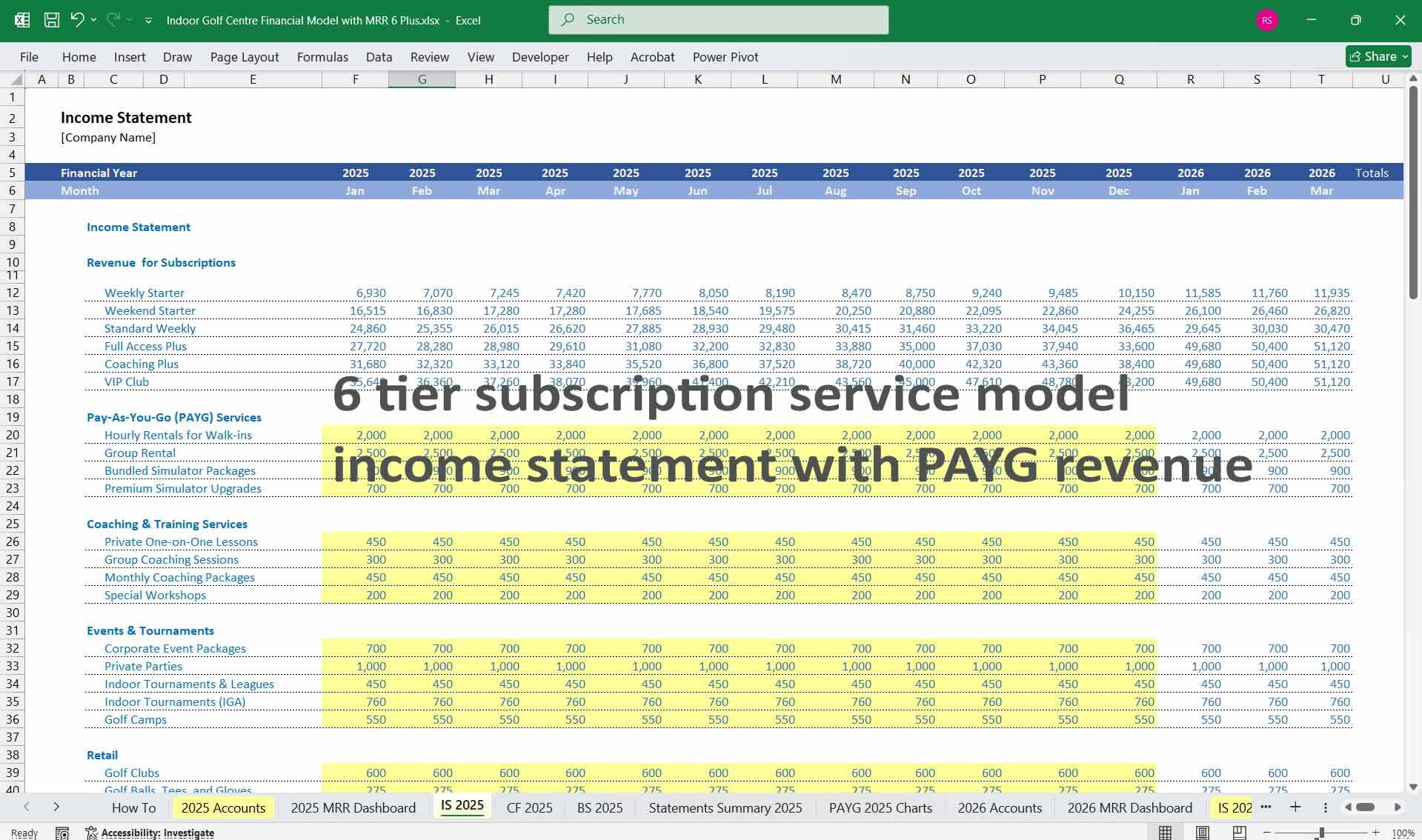
5-Year, 3-Statement model with 6 Tier Subscriptions, as many indoor gold centres are moving towards subscriptions for steady revenue. Plus 22 Inputs for PAYG Services. (Hourly Rentals for Walk-ins, group parties, retail sales, etc.
If you don't use subscriptions yet, just leave those cells blank; the model still works perfectly.
—
1. Business Overview of Your Indoor Golf Centre
An Indoor Golf Centre generates revenue through membership subscriptions, walk-in fees, corporate events, and value-added services such as coaching sessions, equipment rentals, tournaments, food/beverage offerings, and retail.
6-Tier Subscription Model (Adds More Granularity):
Examples:
1. Weekday Starter:
– Weekday mornings only, limited hours (lower price).
2. Weekend Starter:
– Weekend access for part-time enthusiasts.
3. Standard Weekly:
– Unlimited weekdays, restricted weekend hours.
4. Full Access Plus:
– Weekdays and weekends, set simulator hours/month.
5. Coaching Plus:
– Combines **golf simulator access + monthly coaching** hours. Ideal for improving skills.
6. VIP Club:
– Full unlimited access with premium services:
– Private tournaments, priority bookings.
– Special events, personal coaching, free rentals, and loyalty discounts.
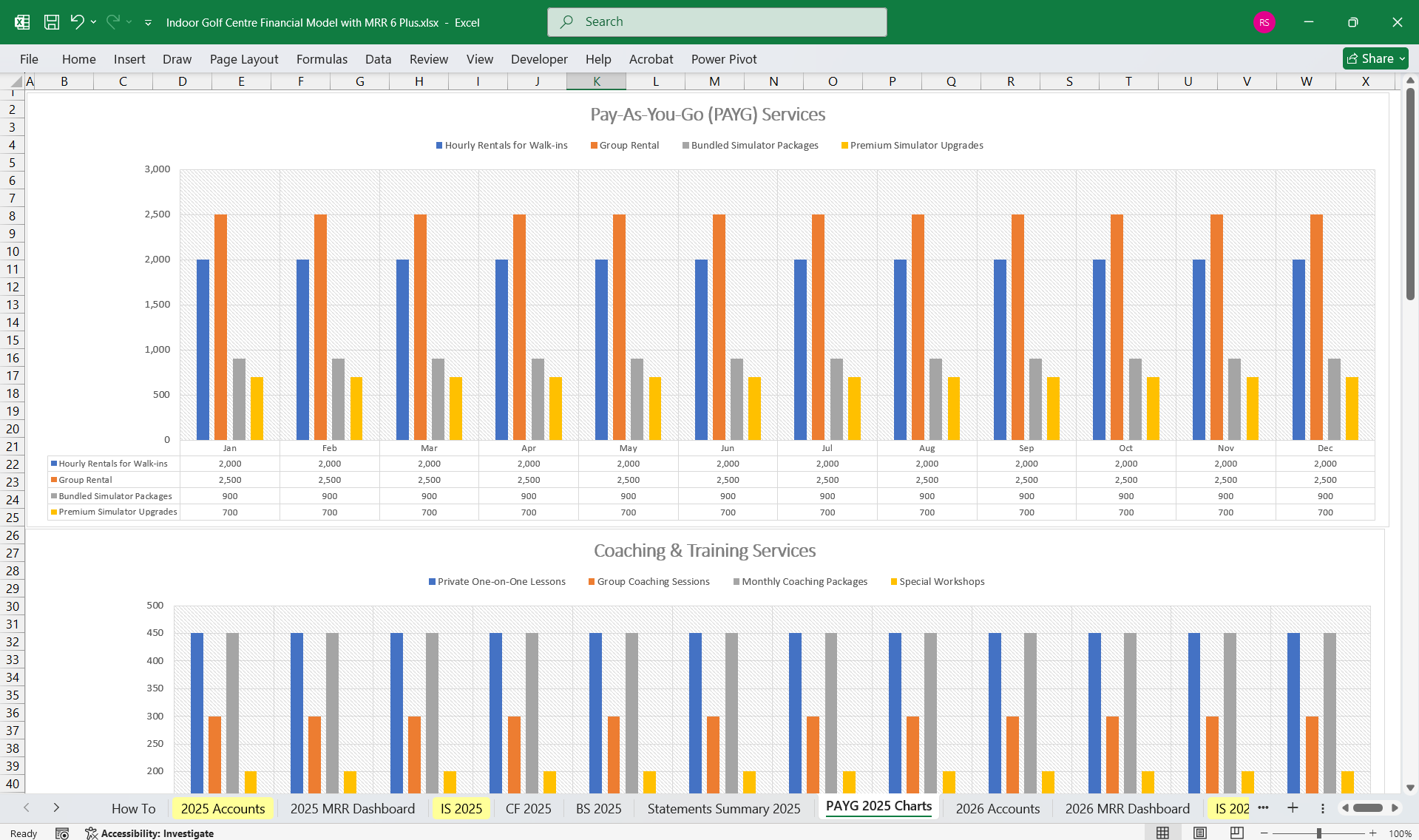
Inputs For PAYG (Fully Editable)
Pay-As-You-Go (PAYG) Services
Hourly Rentals for Walk-ins
Group Rental
Bundled Simulator Packages
Premium Simulator Upgrades
Coaching & Training Services
Private One-on-One Lessons
Group Coaching Sessions
Monthly Coaching Packages
Special Workshops
Events & Tournaments
Corporate Event Packages
Private Parties
Indoor Tournaments & Leagues
Indoor Tournaments (IGA)
Golf Camps
Retail
Golf Clubs
Golf Balls, Tees, and Gloves
Apparel
Accessories
Facility Branded Merchandise
Food & Beverage (F&B)
Snacks, Light Meals, Finger Foods
Non-alcoholic Beverages
Alcoholic Beverages
Specialty Beverages (coffees, smoothies)
The 4-Tier is ideal for a straightforward pricing strategy, while the 6-Tier caters to niche segments for higher segmentation and personalization.
—
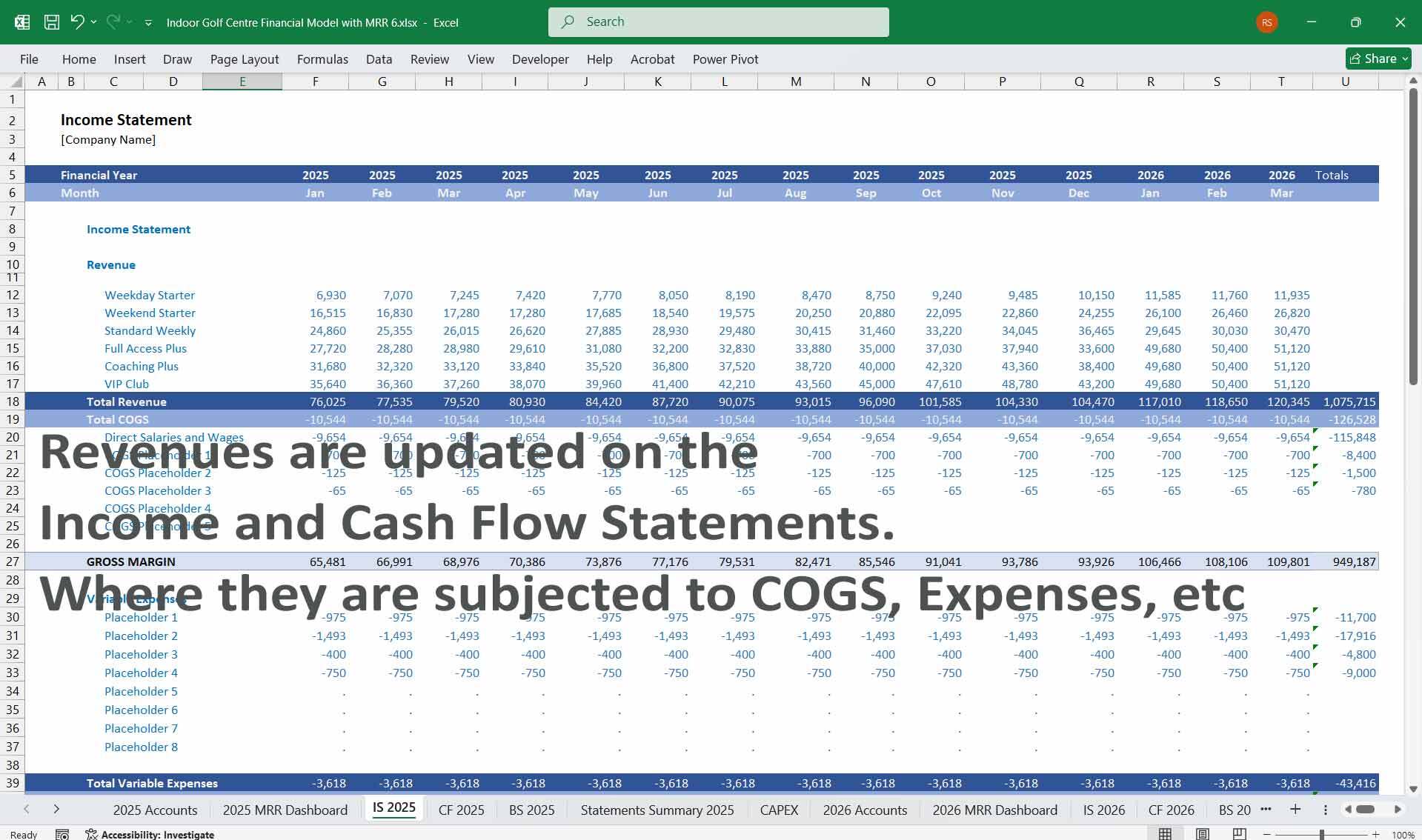
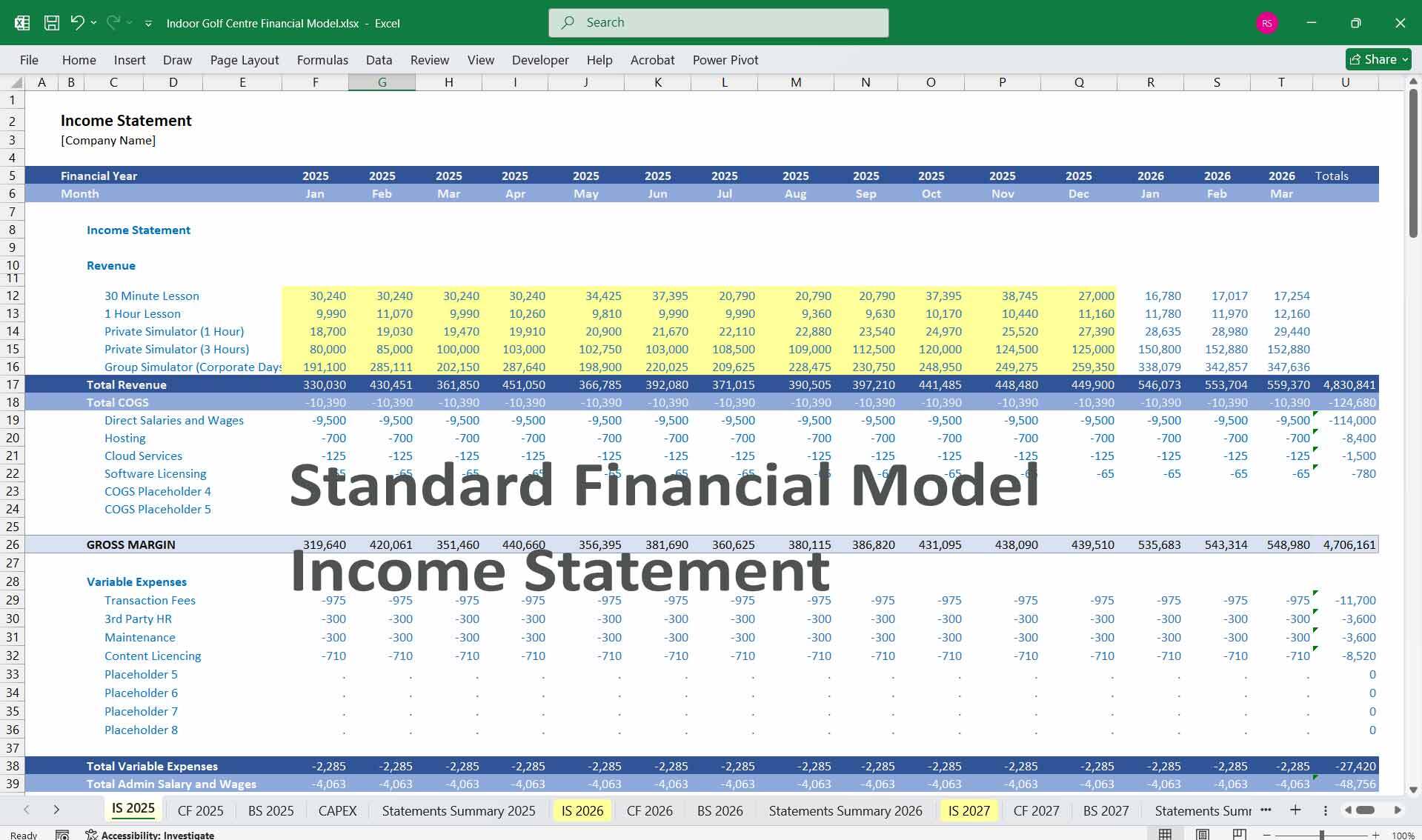
3. Income Statement
The Income Statement shows revenues, costs, and profits over a given period (monthly, quarterly, yearly).
Revenue Streams:
1. Subscription Memberships:
– Monthly or annual fees for 4-tier or 6-tier packages.
– Inputs: Number of subscribers in each tier, average subscription price, renewal rate, churn.
2. Pay-as-You-Go Services:
– Revenue from hourly golf simulator bookings or walk-in players.
– Inputs: Simulator hourly fee, utilization rates, total hours booked.
3. Coaching and Training:
– Fees from private/group coaching sessions (monthly packages or one-off bookings).
4. Events and Tournaments:
– Corporate bookings, private parties, or tournaments held in the facility.
– Inputs: Frequency of events, average event revenue (rental, add-ons like catering).
5. Additional Services:
– Equipment Rentals: Rental revenue for golf clubs, accessories, shoes, etc.
– Retail Sales: Sales from golf equipment, apparel, or branded merchandise.
– Food and Beverage (F&B): Snacks, beverages, and packages available during bookings.
Operating Expenses:
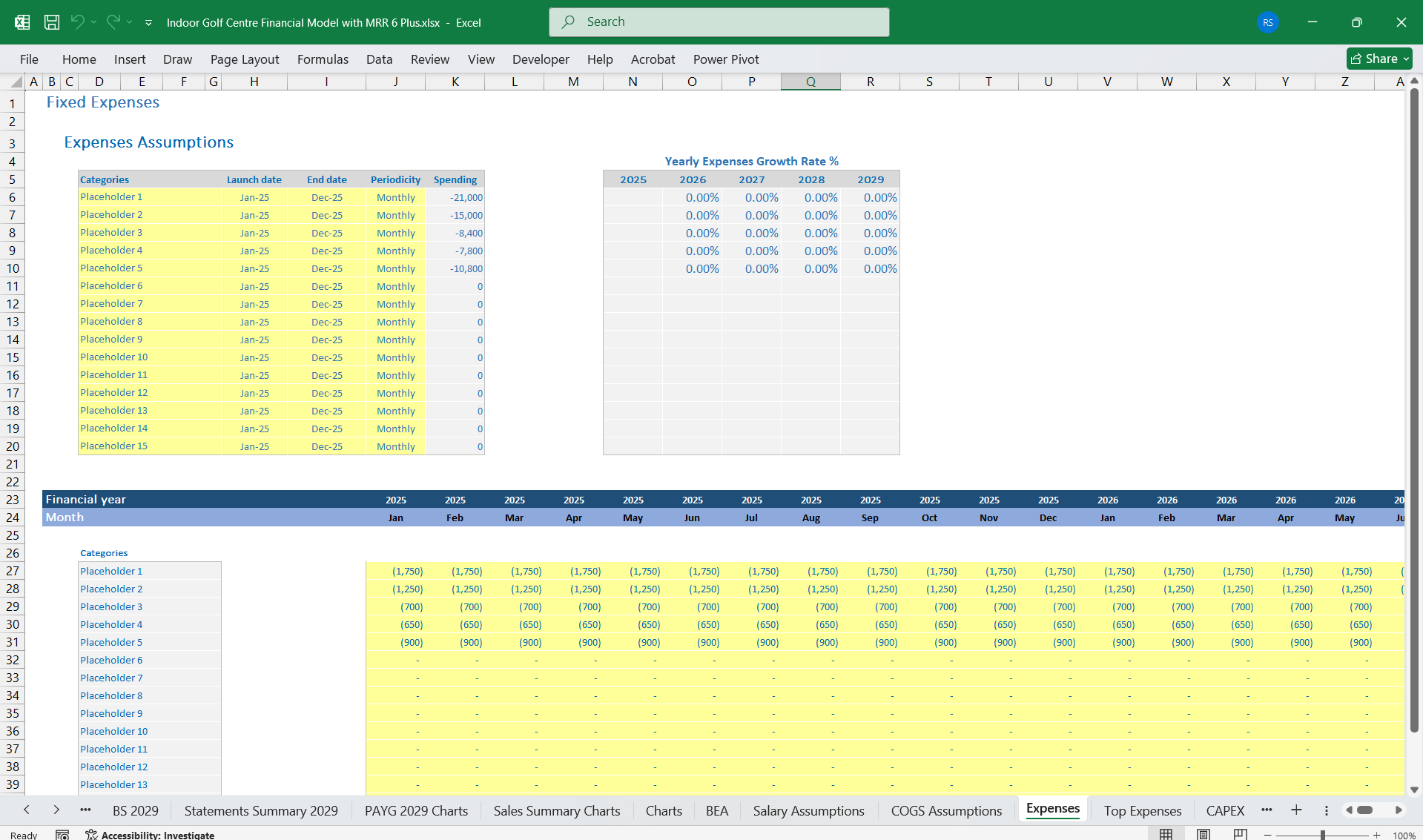
1. Fixed Costs:
– Rent/Lease Payments for facility space.
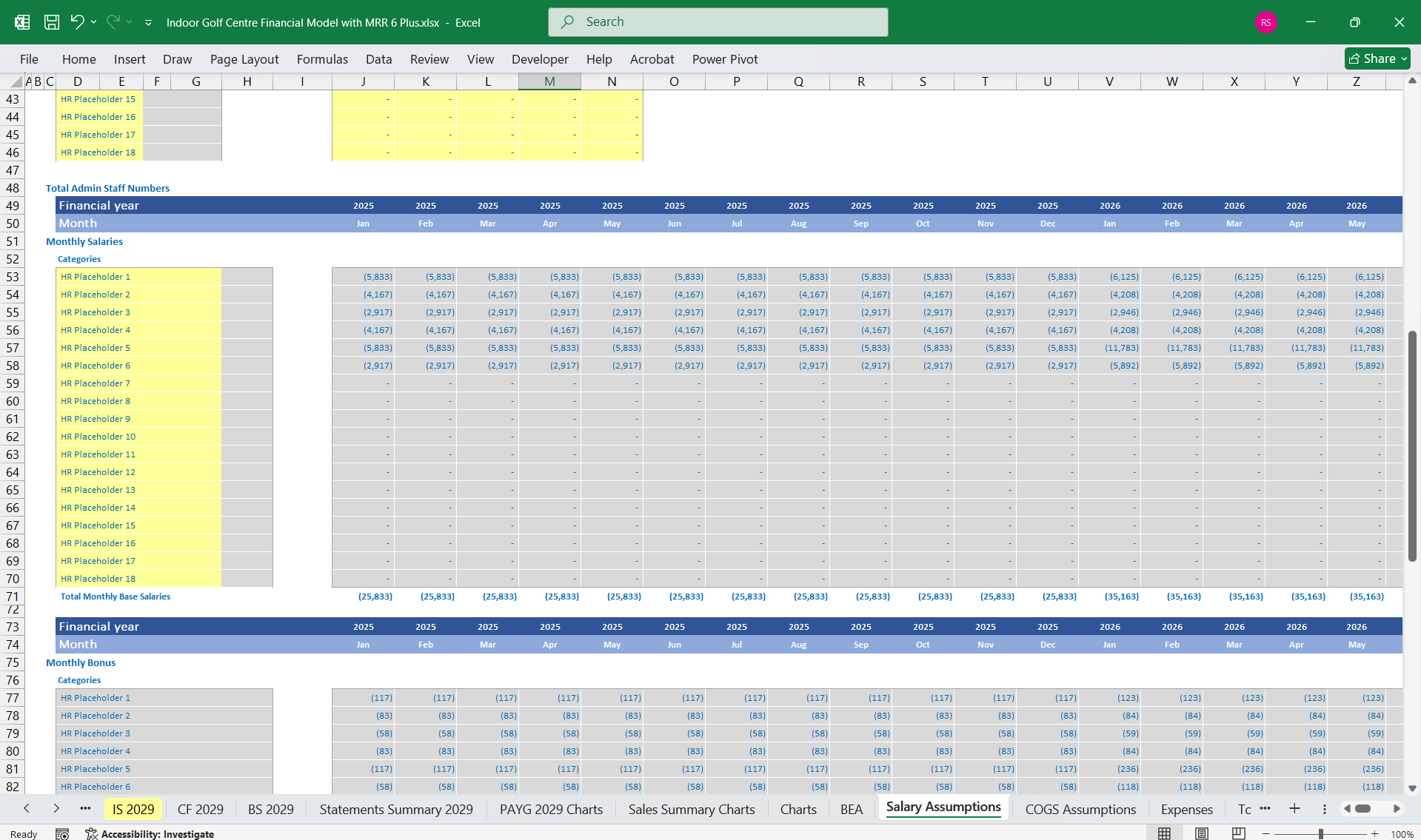
– Staff Salaries: Permanent staff for operations, front desk, cleaning, and admin.
– Insurance: Property, liability, and equipment insurance.
– Utilities: Electricity (simulators), water, Wi-Fi, HVAC.
2. Variable Costs:
– Simulator Maintenance: Repairs or software updates.
– Staff Payments for Coaching: Salaries/commissions for golf coaches.
– Consumables: Golf balls, gloves, and accessories.
– Marketing: Social media ads, promotions, referral discounts, loyalty program rewards.
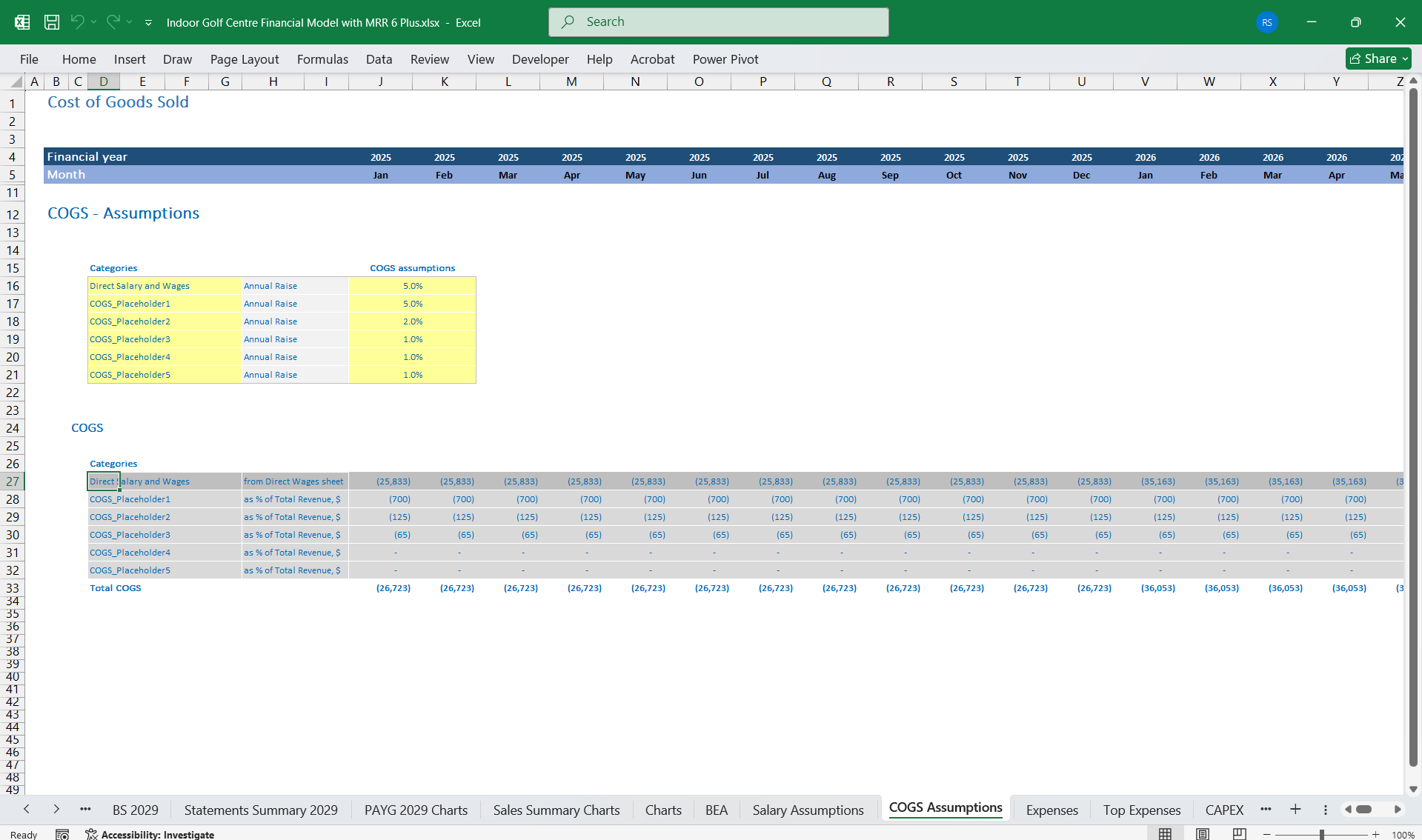
– F&B Supplies: Cost of goods sold (COGS) for food, and beverages.
3. Depreciation:
– Depreciation of golf simulators, furniture, and AV equipment.
4. Interest Expense:
– Costs for loans (used for simulator acquisition, setup, or facility renovation).
Profit Calculation:
– Gross Profit = Revenue – (COGS and Variable Expenses).
– Operating Profit (EBIT) = Gross Profit – Fixed Costs – Depreciation – Marketing.
– Net Profit = EBIT – Interest – Taxes.
—
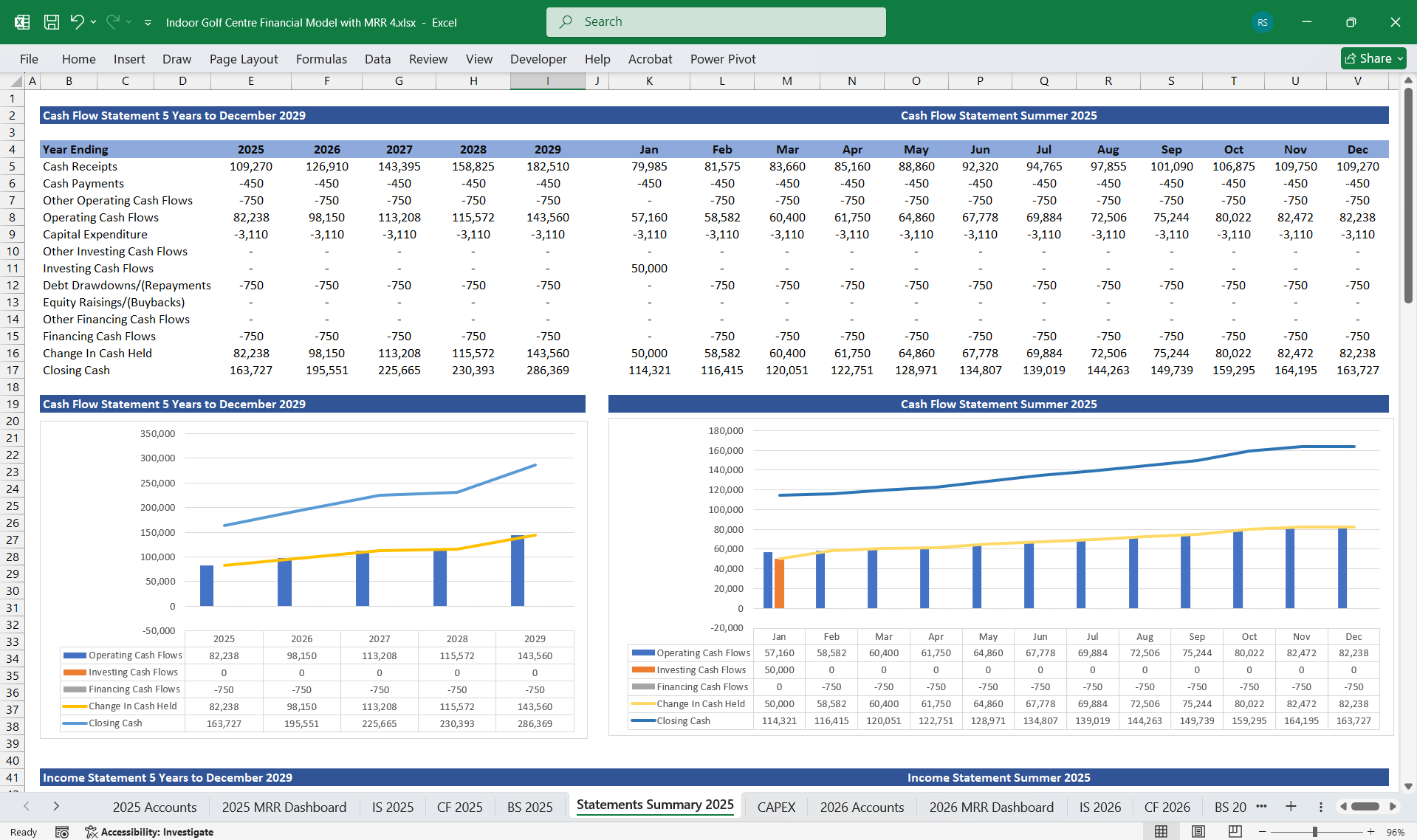
4. Cash Flow Statement
Operating Cash Flow:
1. Cash Inflows:
– Subscription fees (monthly/annual).
– Hourly bookings from Pay-As-You-Go customers.
– Coaching session payments.
– Corporate and private event bookings.
– Equipment rentals, retail sales, and F&B revenue.
2. Cash Outflows:
– Rent, salaries, and utilities.
– Equipment maintenance costs.
– Marketing and promotional activities.
– Coaching and training staff fees.
– F&B and inventory replenishment.
Investing Cash Flow:
1. Cash Outflows:
– Purchase of new simulators or equipment.
– Facility setup costs or renovation for improvements.
– Purchase of retail inventory or F&B inventory.
2. Cash Inflows:
– Sale of outdated equipment.
Financing Cash Flow:
1. Cash Inflows:
– Business loans for initial investments or expansion.
– Investor contributions.
2. Cash Outflows:
– Loan principal repayments and interest payments.
– Profit distributions to owners/shareholders.
Net Cash Flow:
Operating + Investing + Financing Cash Flow = Change in Cash Balance.
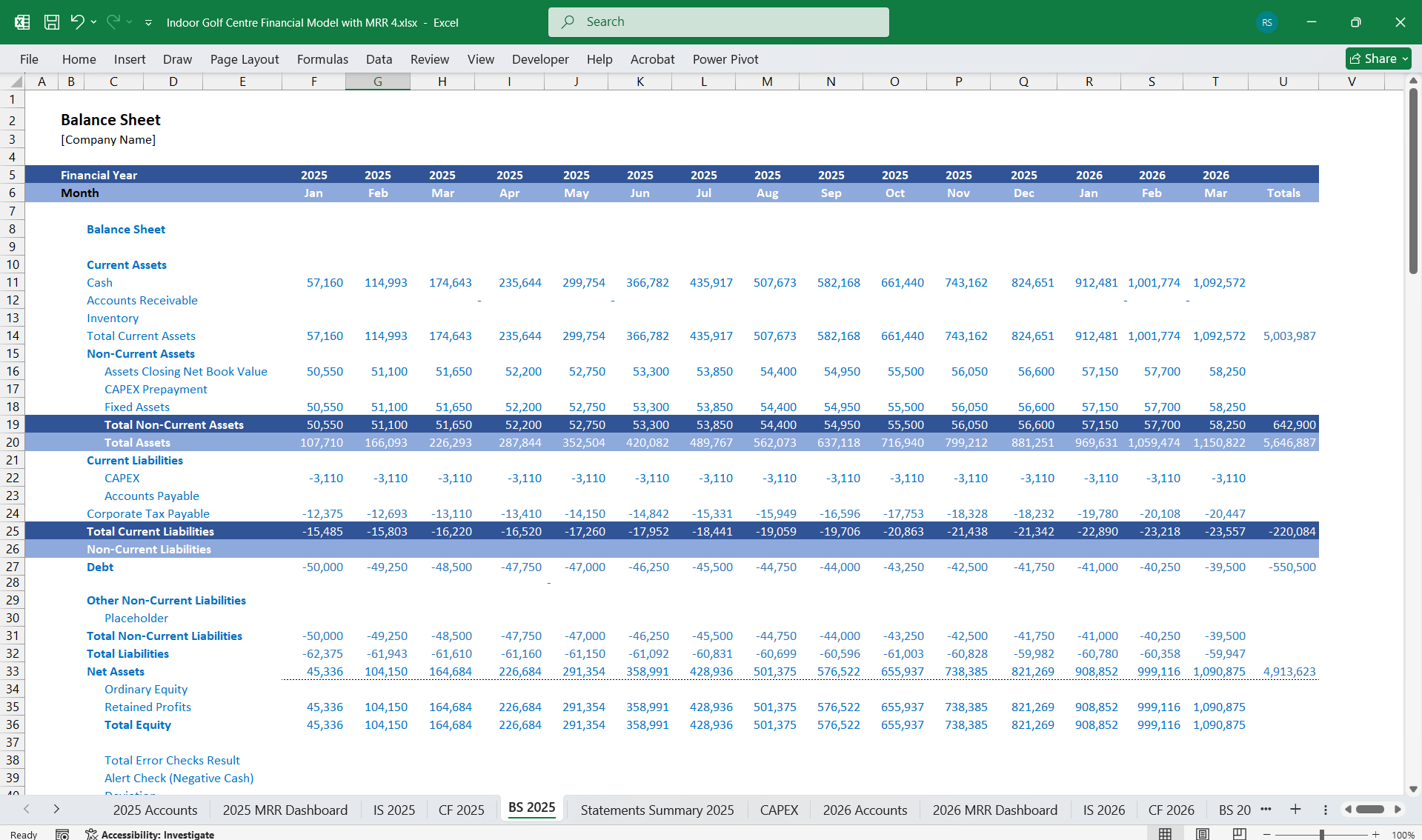
5. Balance Sheet
The Balance Sheet tracks the financial position at a given time, detailing assets, liabilities, and equity.
Assets:
1. Current Assets:
– Cash and Cash Equivalents: Liquidity reserves.
– Accounts Receivable: Outstanding payments for memberships or event bookings.
– Inventory: Retail items (e.g., merchandise) and F&B stock.
2. Non-Current Assets:
– Golf Simulators: Value of the simulators (less accumulated depreciation).
– Furniture, fixtures, and equipment: Tables, chairs, AV equipment, and rental clubs.
– Leasehold Improvements: Facility setup and upgrades.
Liabilities:
1. Current Liabilities:
– Accounts Payable: Payments to vendors for supplies, equipment, or services.
– Deferred Revenue: Advance membership fees or event deposits.
– Short-Term Loan Repayments.
2. Long-Term Liabilities:
– Business loans or financing obligations.
Equity:
– Owner’s Capital: Funds initially invested.
– Retained Earnings: Profits reinvested into the business.
6. Key Metrics and Ratios
1. Average Revenue per Member (ARPU): Revenue / Number of Members.
2. Churn Rate: (Lost Subscribers / Total Subscribers) x 100%.
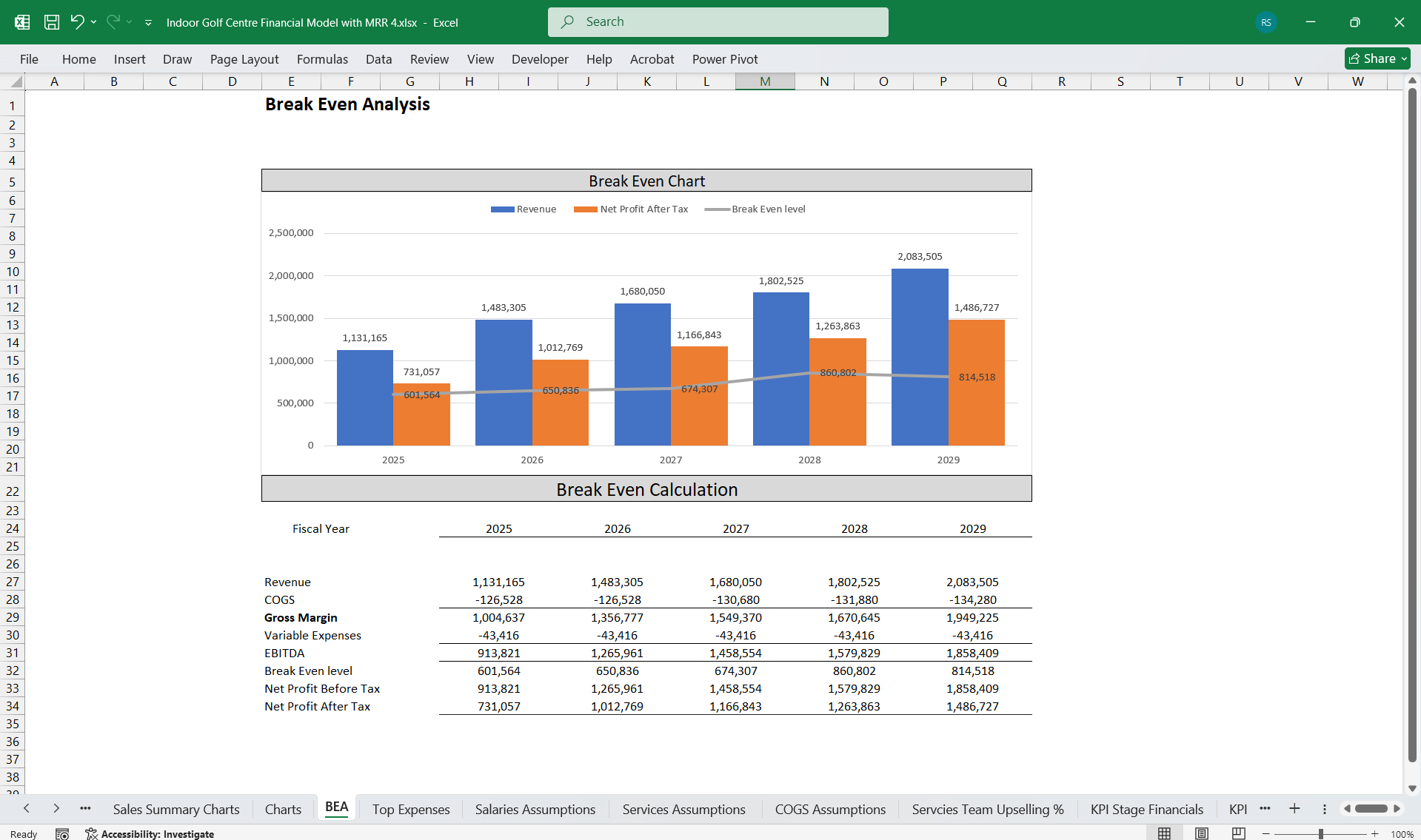
3. Break-Even Point: Fixed Costs / (Average Revenue Per Subscription – Variable Cost Per Subscription).
4. Utilization Rate: (Simulator Hours Booked / Total Available Hours) x 100%.
5. Profit Margins:
– Gross Margin = (Revenue – COGS) / Revenue.
– Operating Margin = Operating Profit / Revenue.
6. Deferred Revenue Ratio: Deferred Revenue / Total Liabilities (healthy prepayments).
ConclusionThis financial model for an Indoor Golf Centre offers a 6-tier subscription model with a flexible service option to stabilize revenue streams and attract both frequent and casual customers. The mix of pay-as-you-go bookings, coaching sessions, events, and retail/F&B offerings further enhances profitability while spreading the risk. Easy monitoring of utilization rates, churn, and financial metrics ensures strong operational and financial performance.
Here’s a detailed financial model for an Indoor Golf Centre. It includes key financial sections such as Income Statement, Cash Flow Statement, and Balance Sheet, along with a detailed breakdown of the 6-Tier subscription model.
5-Year, 3-Statement model with 6 Tier Subscriptions, as many indoor gold centres are moving towards subscriptions for steady revenue. Plus 22 Inputs for PAYG Services. (Hourly Rentals for Walk-ins, group parties, retail sales, etc.
If you don't use subscriptions yet, just leave those cells blank; the model still works perfectly.
—
1. Business Overview of Your Indoor Golf Centre
An Indoor Golf Centre generates revenue through membership subscriptions, walk-in fees, corporate events, and value-added services such as coaching sessions, equipment rentals, tournaments, food/beverage offerings, and retail.
6-Tier Subscription Model (Adds More Granularity):
Examples:
1. Weekday Starter:
– Weekday mornings only, limited hours (lower price).
2. Weekend Starter:
– Weekend access for part-time enthusiasts.
3. Standard Weekly:
– Unlimited weekdays, restricted weekend hours.
4. Full Access Plus:
– Weekdays and weekends, set simulator hours/month.
5. Coaching Plus:
– Combines **golf simulator access + monthly coaching** hours. Ideal for improving skills.
6. VIP Club:
– Full unlimited access with premium services:
– Private tournaments, priority bookings.
– Special events, personal coaching, free rentals, and loyalty discounts.
Inputs For PAYG (Fully Editable)
Pay-As-You-Go (PAYG) Services
Hourly Rentals for Walk-ins
Group Rental
Bundled Simulator Packages
Premium Simulator Upgrades
Coaching & Training Services
Private One-on-One Lessons
Group Coaching Sessions
Monthly Coaching Packages
Special Workshops
Events & Tournaments
Corporate Event Packages
Private Parties
Indoor Tournaments & Leagues
Indoor Tournaments (IGA)
Golf Camps
Retail
Golf Clubs
Golf Balls, Tees, and Gloves
Apparel
Accessories
Facility Branded Merchandise
Food & Beverage (F&B)
Snacks, Light Meals, Finger Foods
Non-alcoholic Beverages
Alcoholic Beverages
Specialty Beverages (coffees, smoothies)
The 4-Tier is ideal for a straightforward pricing strategy, while the 6-Tier caters to niche segments for higher segmentation and personalization.
—
3. Income Statement
The Income Statement shows revenues, costs, and profits over a given period (monthly, quarterly, yearly).
Revenue Streams:
1. Subscription Memberships:
– Monthly or annual fees for 4-tier or 6-tier packages.
– Inputs: Number of subscribers in each tier, average subscription price, renewal rate, churn.
2. Pay-as-You-Go Services:
– Revenue from hourly golf simulator bookings or walk-in players.
– Inputs: Simulator hourly fee, utilization rates, total hours booked.
3. Coaching and Training:
– Fees from private/group coaching sessions (monthly packages or one-off bookings).
4. Events and Tournaments:
– Corporate bookings, private parties, or tournaments held in the facility.
– Inputs: Frequency of events, average event revenue (rental, add-ons like catering).
5. Additional Services:
– Equipment Rentals: Rental revenue for golf clubs, accessories, shoes, etc.
– Retail Sales: Sales from golf equipment, apparel, or branded merchandise.
– Food and Beverage (F&B): Snacks, beverages, and packages available during bookings.
Operating Expenses:
1. Fixed Costs:
– Rent/Lease Payments for facility space.
– Staff Salaries: Permanent staff for operations, front desk, cleaning, and admin.
– Insurance: Property, liability, and equipment insurance.
– Utilities: Electricity (simulators), water, Wi-Fi, HVAC.
2. Variable Costs:
– Simulator Maintenance: Repairs or software updates.
– Staff Payments for Coaching: Salaries/commissions for golf coaches.
– Consumables: Golf balls, gloves, and accessories.
– Marketing: Social media ads, promotions, referral discounts, loyalty program rewards.
– F&B Supplies: Cost of goods sold (COGS) for food, and beverages.
3. Depreciation:
– Depreciation of golf simulators, furniture, and AV equipment.
4. Interest Expense:
– Costs for loans (used for simulator acquisition, setup, or facility renovation).
Profit Calculation:
– Gross Profit = Revenue – (COGS and Variable Expenses).
– Operating Profit (EBIT) = Gross Profit – Fixed Costs – Depreciation – Marketing.
– Net Profit = EBIT – Interest – Taxes.
—
4. Cash Flow Statement
Operating Cash Flow:
1. Cash Inflows:
– Subscription fees (monthly/annual).
– Hourly bookings from Pay-As-You-Go customers.
– Coaching session payments.
– Corporate and private event bookings.
– Equipment rentals, retail sales, and F&B revenue.
2. Cash Outflows:
– Rent, salaries, and utilities.
– Equipment maintenance costs.
– Marketing and promotional activities.
– Coaching and training staff fees.
– F&B and inventory replenishment.
Investing Cash Flow:
1. Cash Outflows:
– Purchase of new simulators or equipment.
– Facility setup costs or renovation for improvements.
– Purchase of retail inventory or F&B inventory.
2. Cash Inflows:
– Sale of outdated equipment.
Financing Cash Flow:
1. Cash Inflows:
– Business loans for initial investments or expansion.
– Investor contributions.
2. Cash Outflows:
– Loan principal repayments and interest payments.
– Profit distributions to owners/shareholders.
Net Cash Flow:
Operating + Investing + Financing Cash Flow = Change in Cash Balance.
5. Balance Sheet
The Balance Sheet tracks the financial position at a given time, detailing assets, liabilities, and equity.
Assets:
1. Current Assets:
– Cash and Cash Equivalents: Liquidity reserves.
– Accounts Receivable: Outstanding payments for memberships or event bookings.
– Inventory: Retail items (e.g., merchandise) and F&B stock.
2. Non-Current Assets:
– Golf Simulators: Value of the simulators (less accumulated depreciation).
– Furniture, fixtures, and equipment: Tables, chairs, AV equipment, and rental clubs.
– Leasehold Improvements: Facility setup and upgrades.
Liabilities:
1. Current Liabilities:
– Accounts Payable: Payments to vendors for supplies, equipment, or services.
– Deferred Revenue: Advance membership fees or event deposits.
– Short-Term Loan Repayments.
2. Long-Term Liabilities:
– Business loans or financing obligations.
Equity:
– Owner’s Capital: Funds initially invested.
– Retained Earnings: Profits reinvested into the business.
6. Key Metrics and Ratios
1. Average Revenue per Member (ARPU): Revenue / Number of Members.
2. Churn Rate: (Lost Subscribers / Total Subscribers) x 100%.
3. Break-Even Point: Fixed Costs / (Average Revenue Per Subscription – Variable Cost Per Subscription).
4. Utilization Rate: (Simulator Hours Booked / Total Available Hours) x 100%.
5. Profit Margins:
– Gross Margin = (Revenue – COGS) / Revenue.
– Operating Margin = Operating Profit / Revenue.
6. Deferred Revenue Ratio: Deferred Revenue / Total Liabilities (healthy prepayments).
ConclusionThis financial model for an Indoor Golf Centre offers a 6-tier subscription model with a flexible service option to stabilize revenue streams and attract both frequent and casual customers. The mix of pay-as-you-go bookings, coaching sessions, events, and retail/F&B offerings further enhances profitability while spreading the risk. Easy monitoring of utilization rates, churn, and financial metrics ensures strong operational and financial performance.
This Best Practice includes
Indoor Golf Centre Finance Model
Further information
Provides thorough oversight, tracking, and reporting of Indoor Golf Centre finances, including updates on budget utilisation and projections.
