

Automated QR Code Creator in Excel (Free Utility Tool)
Originally published: 28/12/2020 21:49
Last version published: 08/05/2025 08:19
Publication number: ELQ-62942-2
View all versions & Certificate
certified

Automated QR Code Creator in Excel (Free Utility Tool)

A free Excel utility that generates fully customizable QR Codes using VBA. Supports custom size, color, and export to image or PDF – no add-ins required.

Description

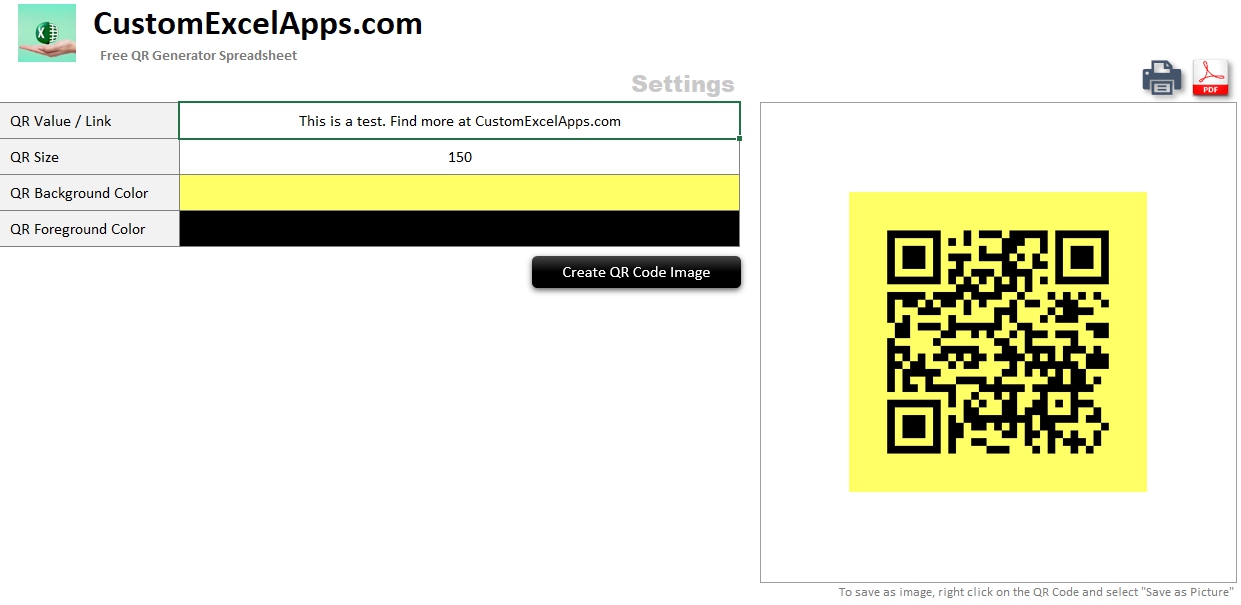
Create and export fully customized QR Codes directly from Excel — no plugins, no internet, no limits. This free tool is a fully functional Excel-based QR Code generator built entirely in VBA. It allows users to instantly create scannable QR Codes for any type of content: URLs, short messages, product IDs, internal documentation links, and more. Whether you're a freelancer, small business owner, or operations manager, this utility helps you automate one of the most time-consuming branding and labeling tasks — right inside Excel.

The tool provides a clean interface with no technical setup required. Simply enter the text or link you wish to encode, choose your preferred QR image size (from 30 to 300 pixels), and customize both foreground and background colors using the built-in Excel color selectors.

With a single click, the QR Code is generated and displayed in your worksheet. You can then right-click and save the image as PNG, or instantly export it to PDF using the integrated buttons.
Key Benefits

  • 100% native Excel + VBA (no need for add-ins or APIs)

  • Professional-grade output: ideal for labels, documents, menus

  • Fast setup: just open and start generating

  • Export options: image and PDF support

Who it’s for
  • Product-based businesses

  • Restaurants and hospitality services

  • Internal documentation workflows

      This Best Practice includes
      1 downloadable .xlsm file in compressed zip format

      Thomas Biziouras - Excel Business Apps offers you this Best Practice for free!

      download for free

      Add to bookmarks

      Discuss

      Further information

      To enable professionals to generate and export customized QR codes directly from Excel, without external tools or add-ins.

      Requires Microsoft Excel for Windows with macros enabled (i.e. .xlsm file support). Best suited for desktop environments.

      Not compatible with Excel Mobile or Excel Online. VBA functionality is only supported on desktop Excel for Windows.


      0.0 / 5 (0 votes)

      please wait...