
Lean Six Sigma Operations Excel Template | OEE, FMEA, SOP, Kaizen, 5 Why, Risk & Project Dashboard

Lean Six Sigma Excel system with OEE, FMEA, SIPOC, 5 Why, SOP, Kaizen, risk, projects, audits, capacity, dashboard and 5S bonus tracker.

Description

πŸ“Š LEAN SIX SIGMA OPERATIONS & PROCESS EXCELLENCE CONTROL CENTER


Bring operational performance, process improvement, quality management, risk control, projects, audits, capacity, and improvement actions into one structured Excel system.


Designed for operations managers, Lean Six Sigma professionals, quality teams, manufacturing teams, process-improvement specialists, consultants, and project managers, this professional toolkit combines operational measurement with practical improvement and control workflows.


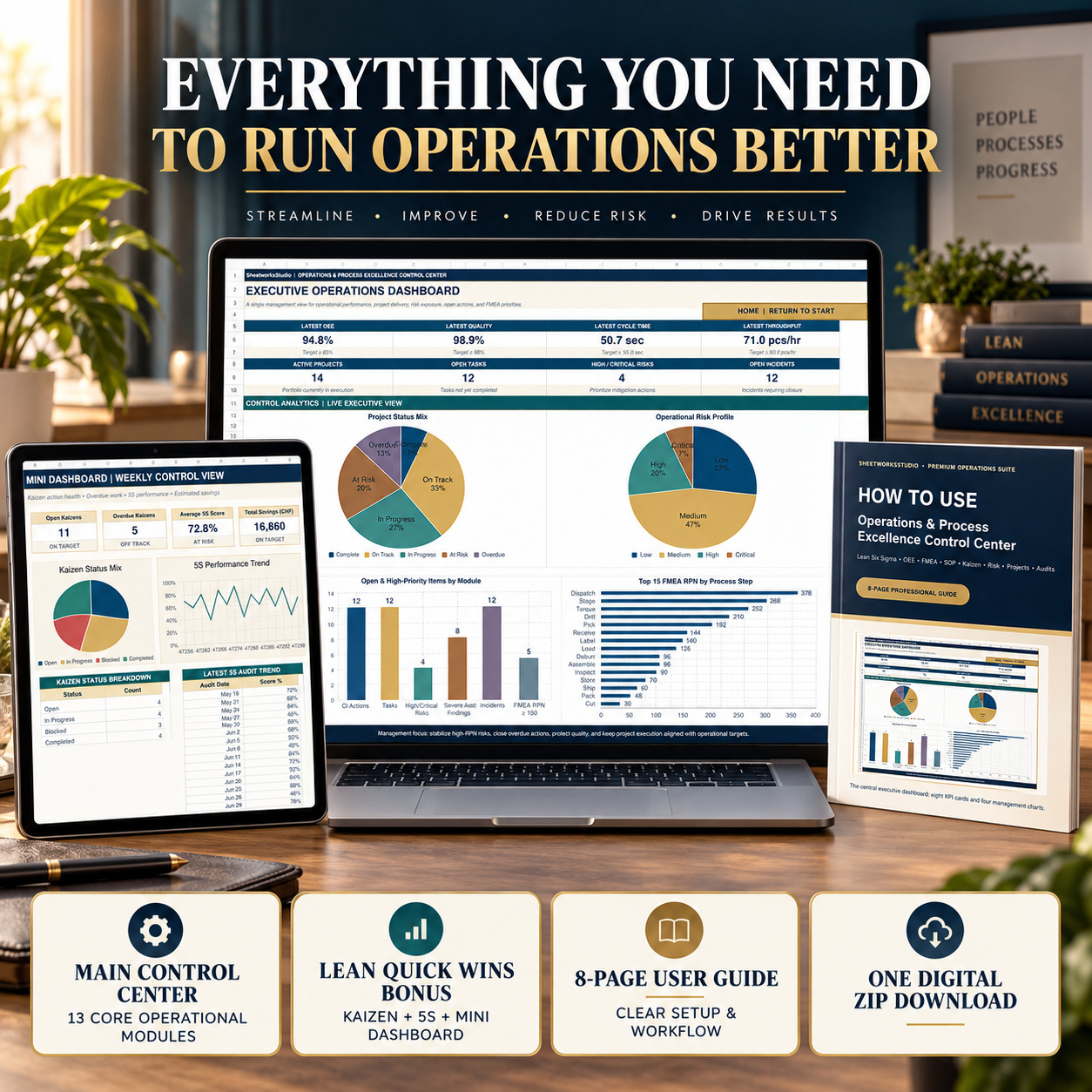
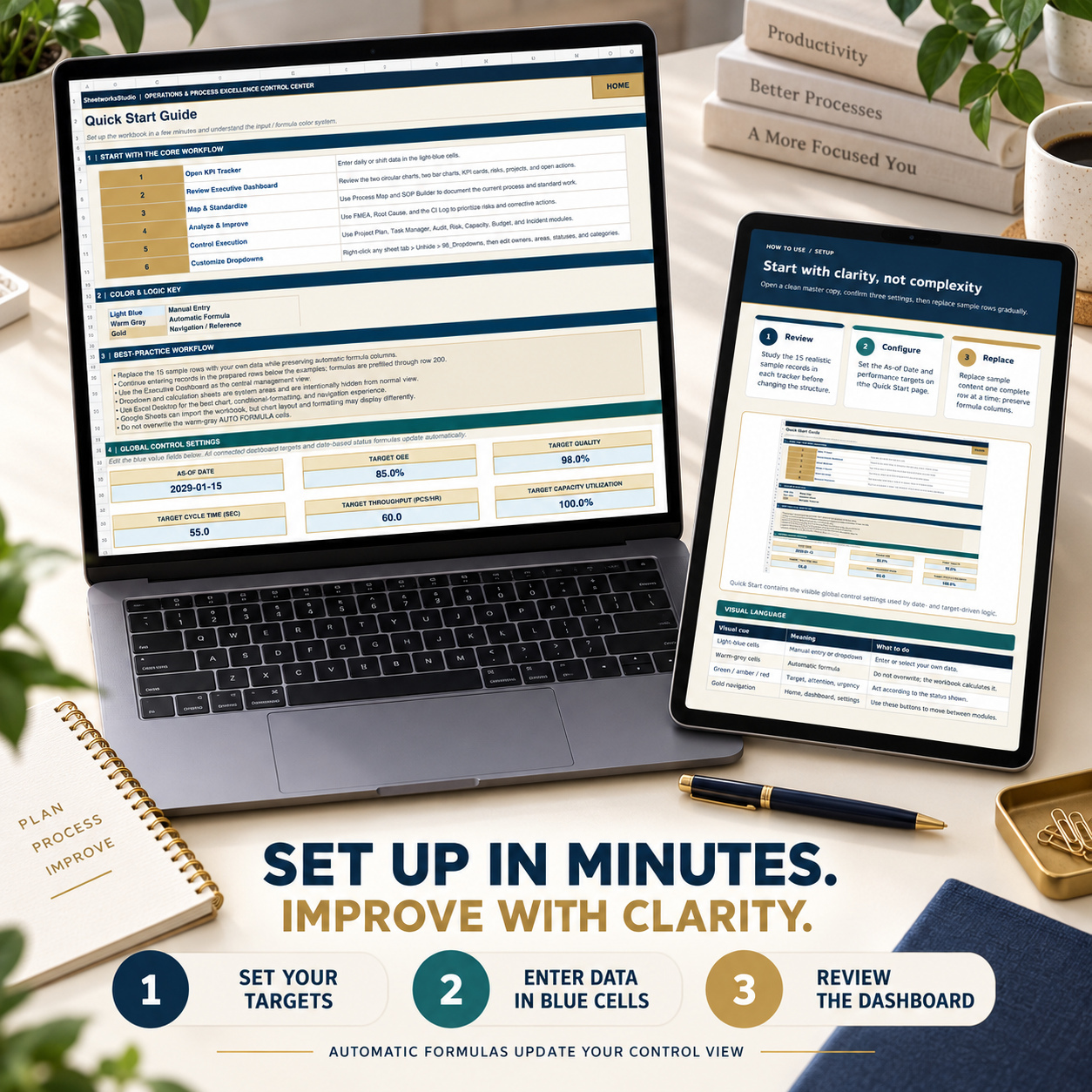
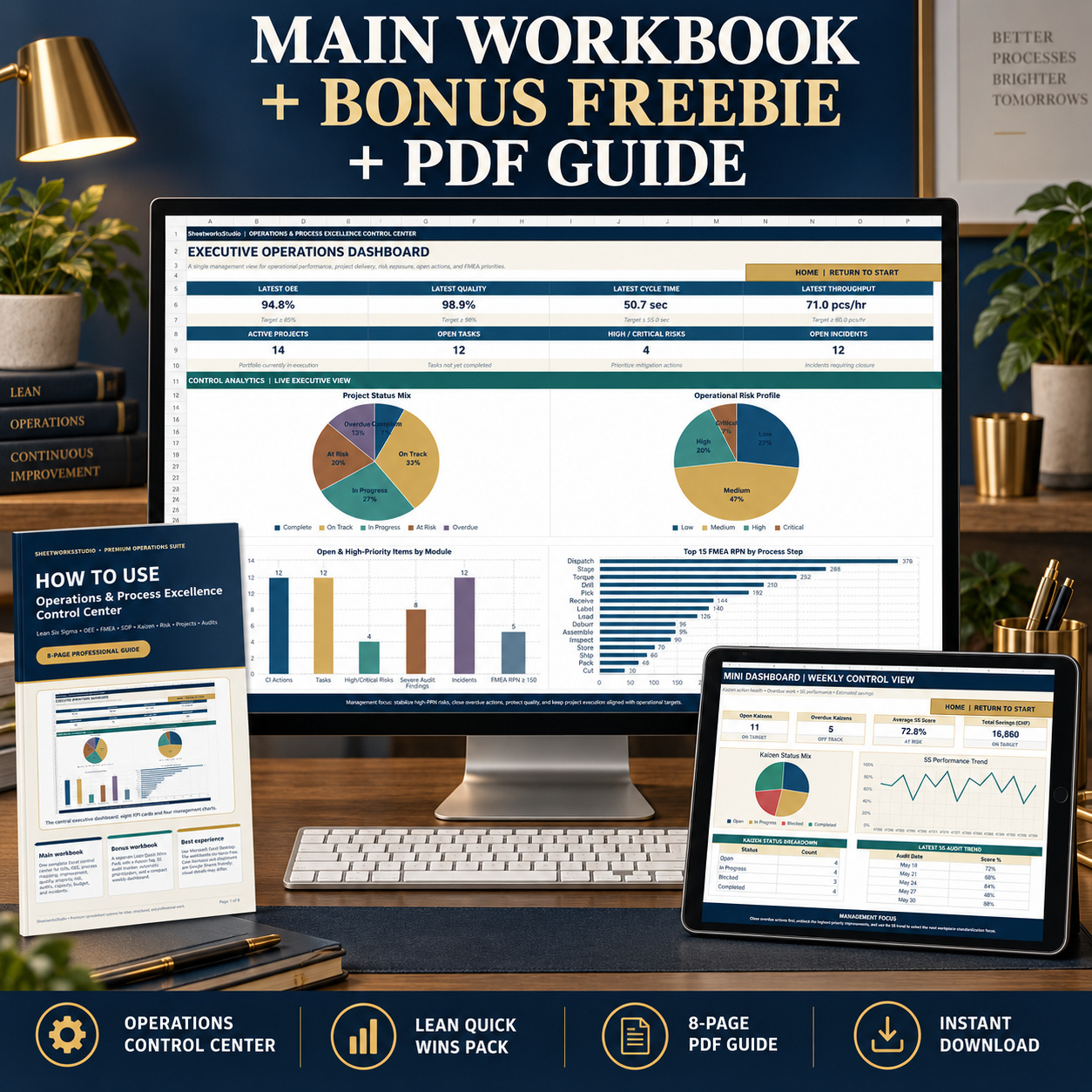
The package includes an 18-worksheet Operations & Process Excellence Control Center, a separate Lean Quick Wins Bonus Workbook, and an 8-page How-to-Use PDF Guide.

Realistic sample data is included throughout the trackers so users can understand the workflow before gradually replacing the examples with their own operational information.


πŸ“ˆ OEE & OPERATIONAL KPI TRACKING

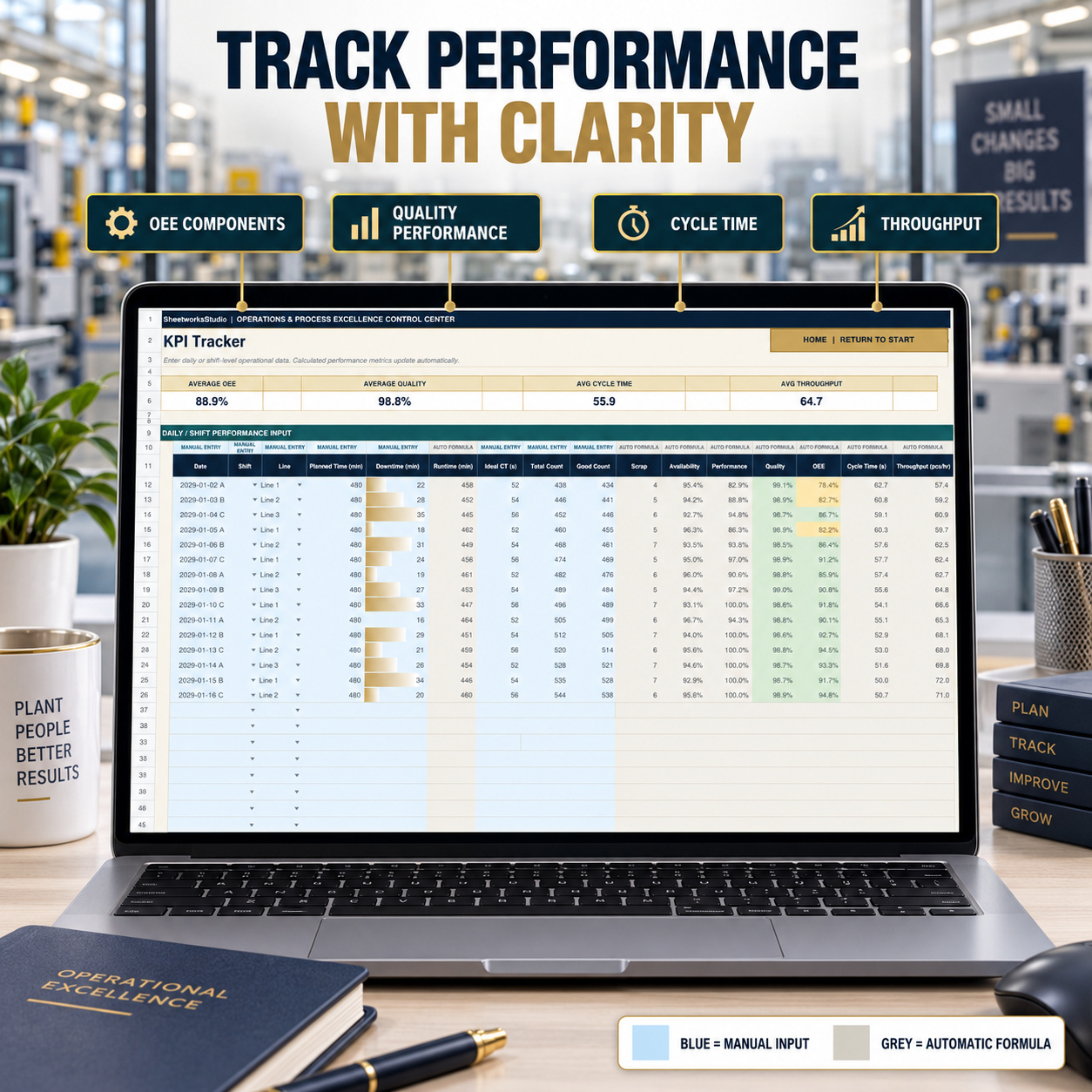
The KPI Tracker supports daily or shift-level operational monitoring using:

βœ… Planned Time βœ… Downtime βœ… Runtime βœ… Ideal Cycle Time βœ… Total Count βœ… Good Count βœ… Scrap


Automatic calculations include:

βœ… Availability βœ… Performance βœ… Quality βœ… OEE βœ… Cycle Time βœ… Throughput


The workbook clearly separates Manual Entry fields from Auto Formula outputs, supporting controlled data entry and easier review.


πŸ—ΊοΈ PROCESS MAPPING & SIPOC

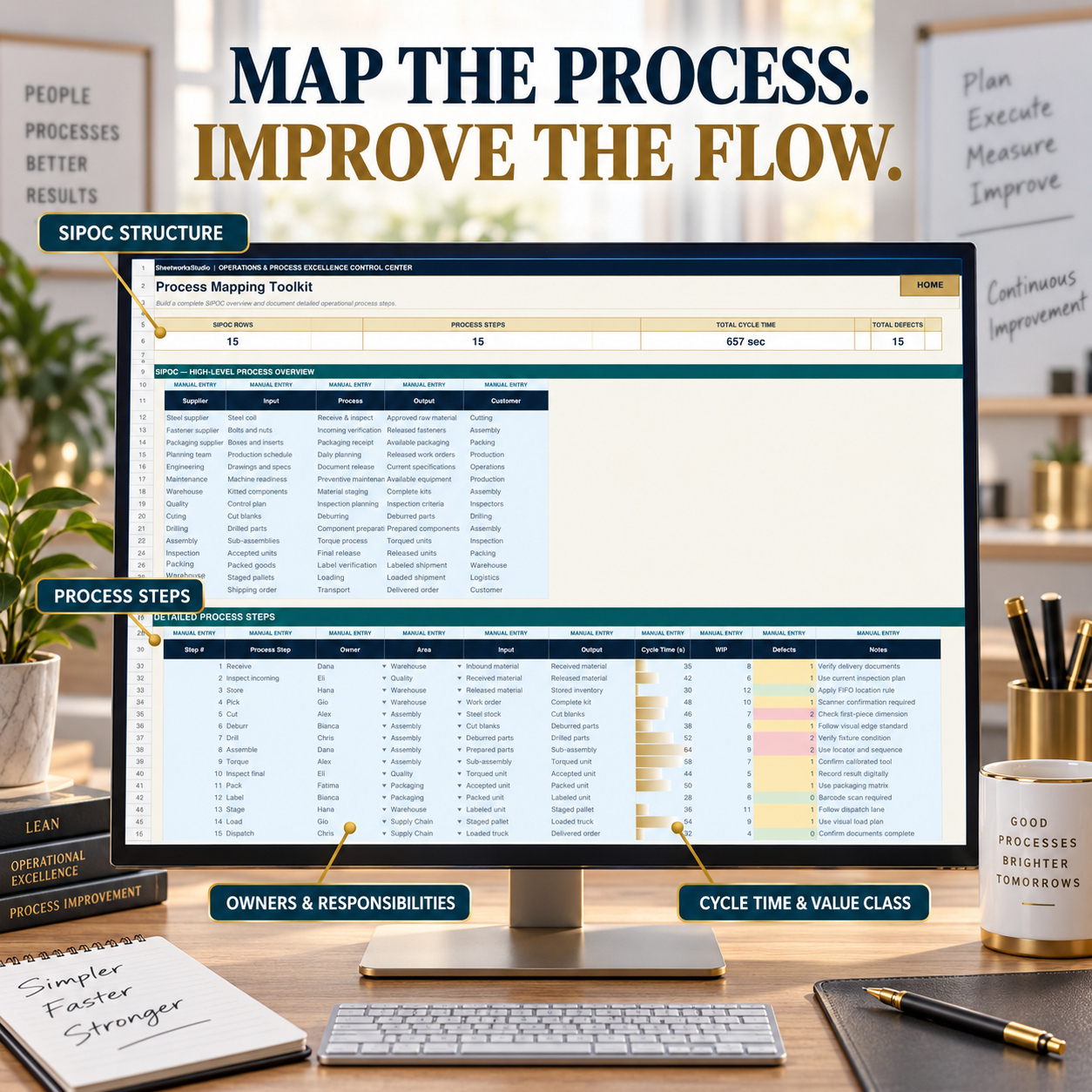
The Process Mapping Toolkit provides a structured framework for documenting:

βœ… Suppliers βœ… Inputs βœ… Process Steps βœ… Outputs βœ… Customers βœ… Process Ownership βœ… Cycle Time βœ… Value Classification βœ… Defects and operational observations


This supports high-level SIPOC analysis together with more detailed process documentation.


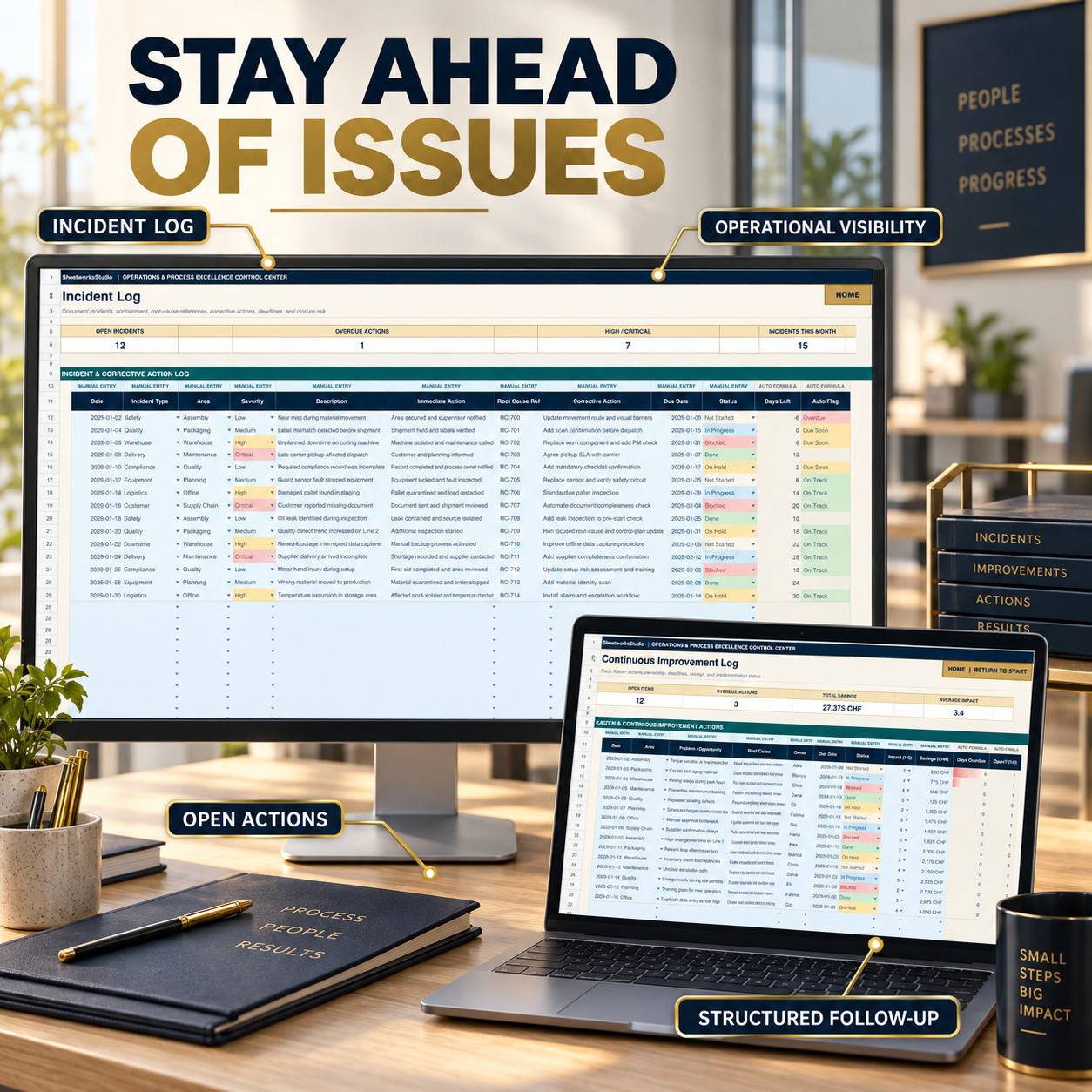
πŸ’‘ CONTINUOUS IMPROVEMENT

The Continuous Improvement Log helps teams manage Kaizen and operational improvement actions through:

βœ… Problem / Opportunity βœ… Root Cause βœ… Countermeasure βœ… Owner βœ… Due Date βœ… Status βœ… Impact βœ… Estimated Savings βœ… Days Overdue βœ… Open / Closed Logic


This creates a traceable improvement pipeline rather than isolated improvement ideas.


πŸ§ͺ FMEA & AUTOMATIC RPN

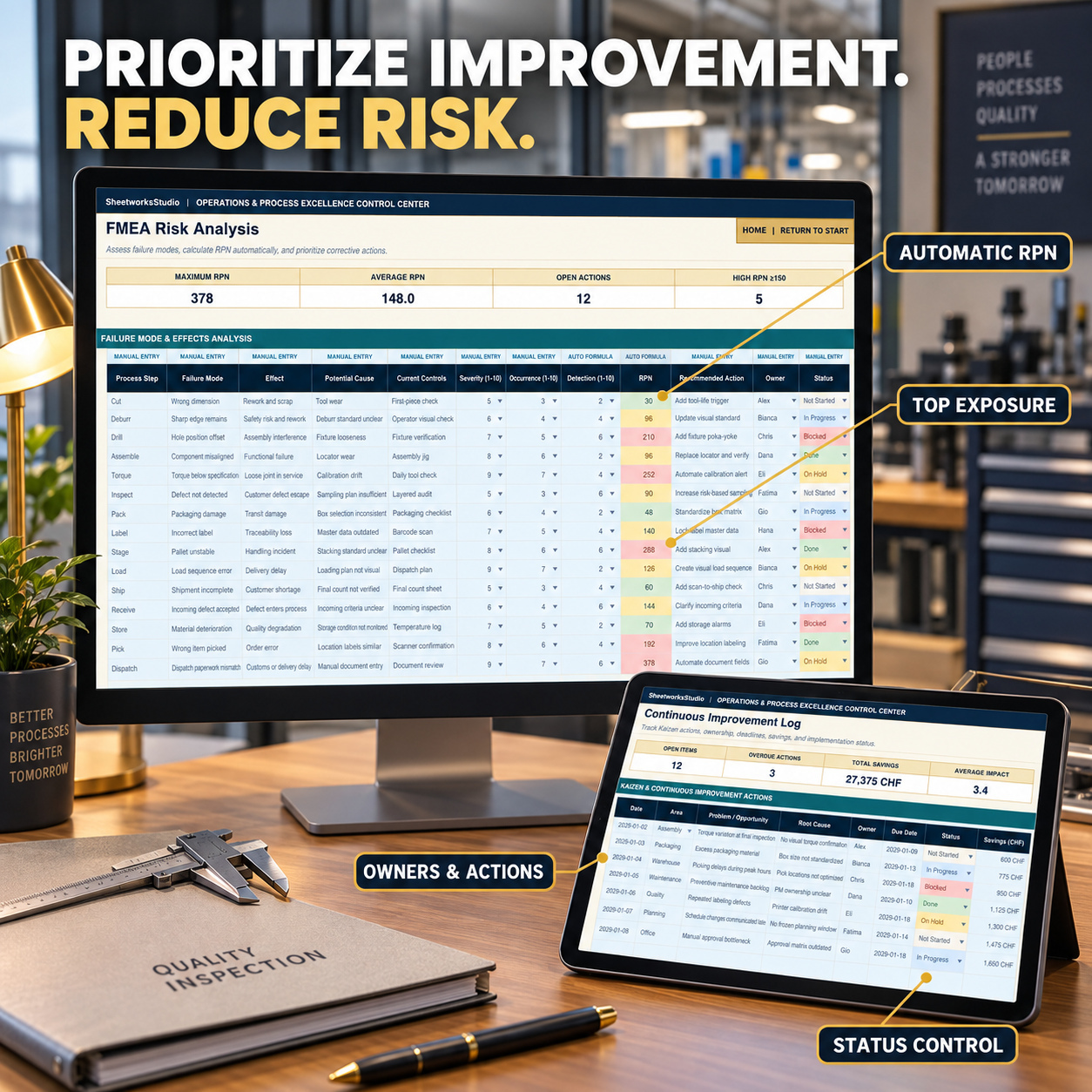
The FMEA module provides structured Failure Mode and Effects Analysis with:

βœ… Process Step βœ… Failure Mode βœ… Effect βœ… Potential Cause βœ… Current Controls βœ… Severity βœ… Occurrence βœ… Detection βœ… Recommended Action βœ… Owner βœ… Status


RPN = Severity Γ— Occurrence Γ— Detection

RPN values calculate automatically, helping teams identify and prioritize higher-risk failure modes. Dashboard analytics also highlight the process steps with the highest current RPN exposure.


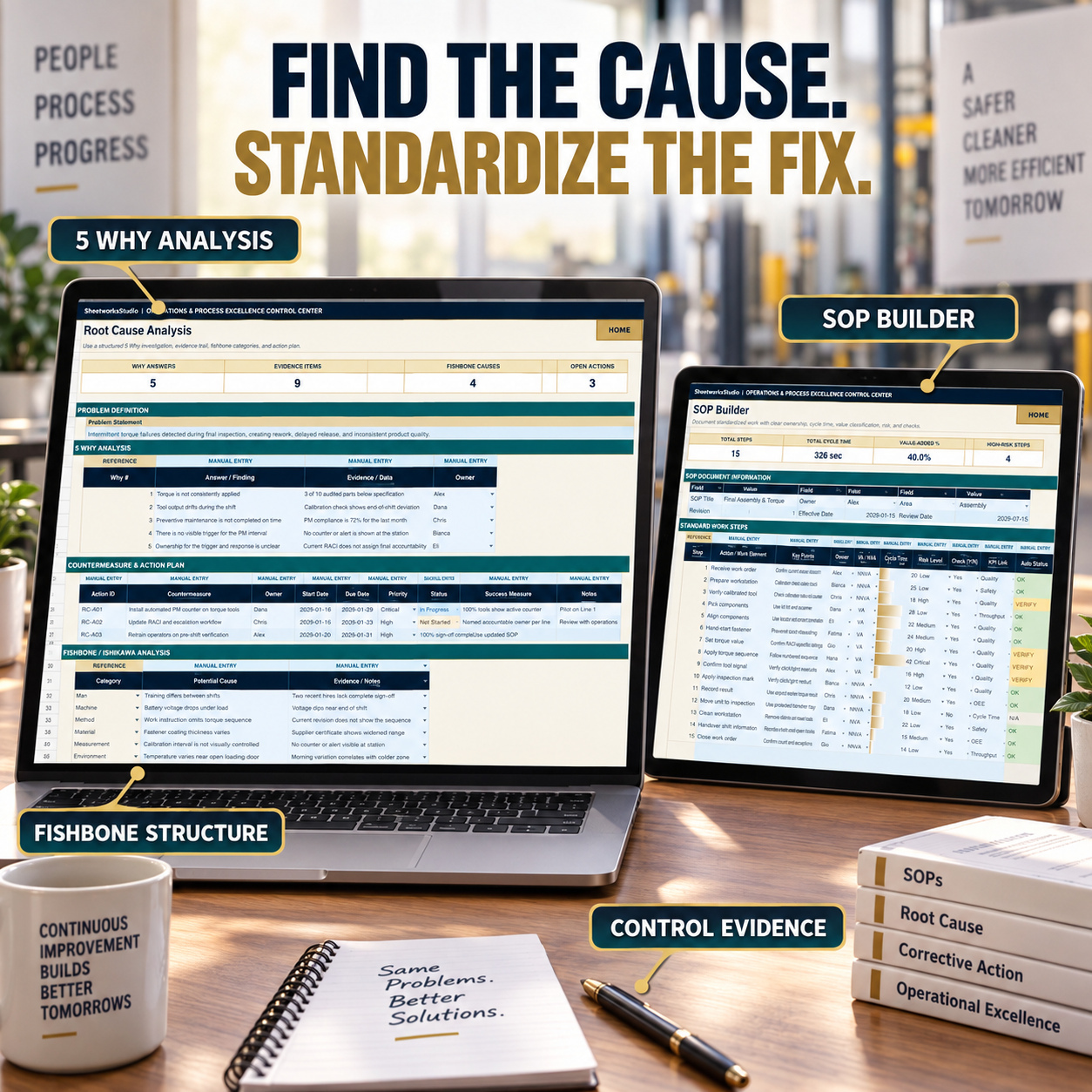
πŸ”Ž ROOT CAUSE ANALYSIS

The Root Cause module combines multiple structured investigation tools:

βœ… Problem Definition βœ… 5 Why Analysis βœ… Evidence / Data βœ… Ownership βœ… Countermeasure Action Plan βœ… Success Measures βœ… Fishbone / Ishikawa Analysis


Fishbone categories include Man, Machine, Method, Material, Measurement, and Environment, providing a structured framework for investigating potential causes.


πŸ“„ SOP BUILDER

Create and document standardized work using:

βœ… SOP Title βœ… Owner βœ… Area βœ… Revision βœ… Effective Date βœ… Review Date βœ… Process Steps βœ… Key Points βœ… Responsible Owner βœ… VA / NVA Classification βœ… Cycle Time βœ… Risk Level βœ… Required Check βœ… KPI Link βœ… Automatic Status


Summary indicators include total steps, total cycle time, value-added percentage, and high-risk process steps.


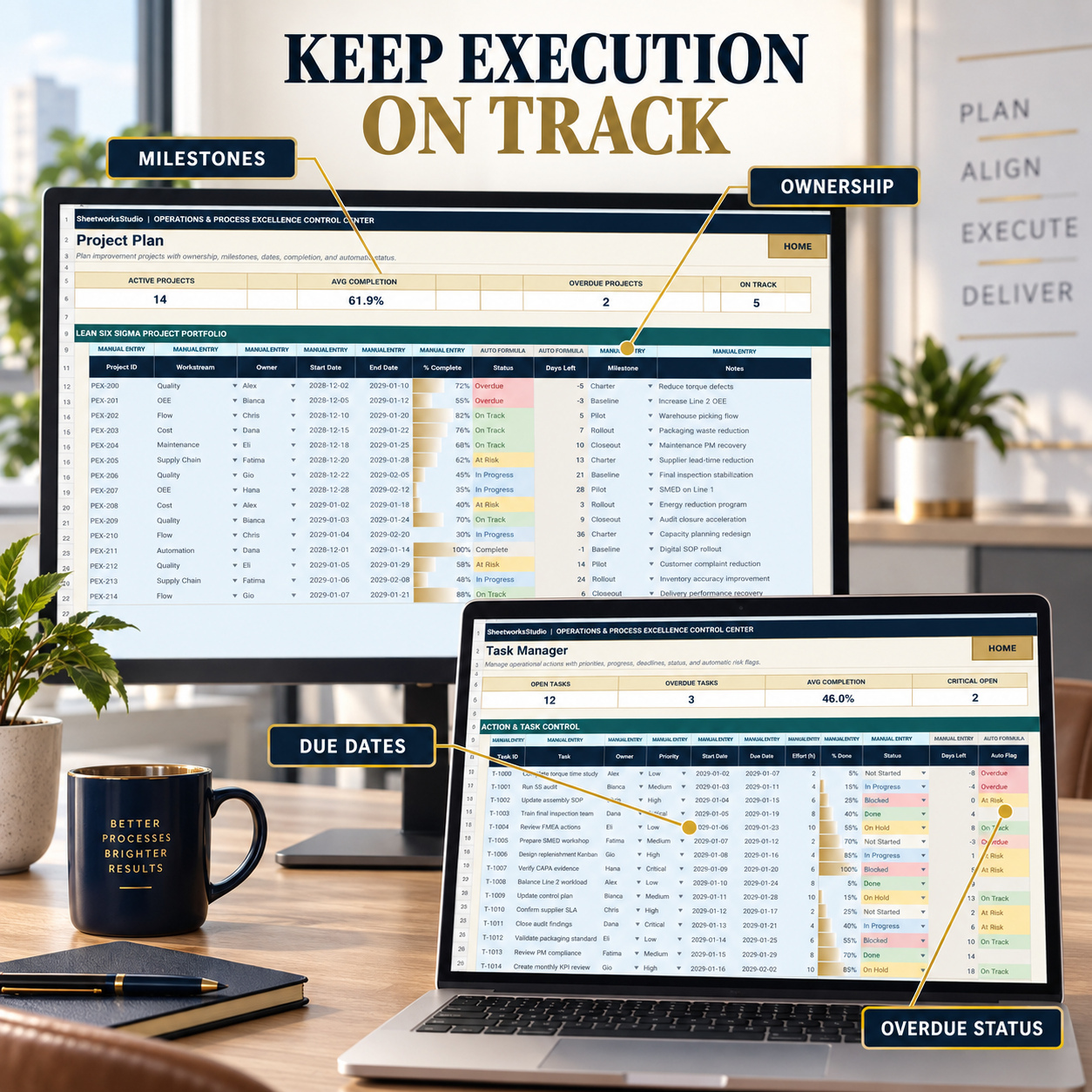
πŸ“… PROJECT & TASK MANAGEMENT

The Project Plan supports improvement initiatives with:

βœ… Workstream βœ… Owner βœ… Start and End Dates βœ… Completion % βœ… Automatic Status βœ… Days Remaining βœ… Milestones βœ… Notes


The separate Task Manager provides action-level control with priority, effort, progress, due dates, overdue logic, and automatic risk flags.


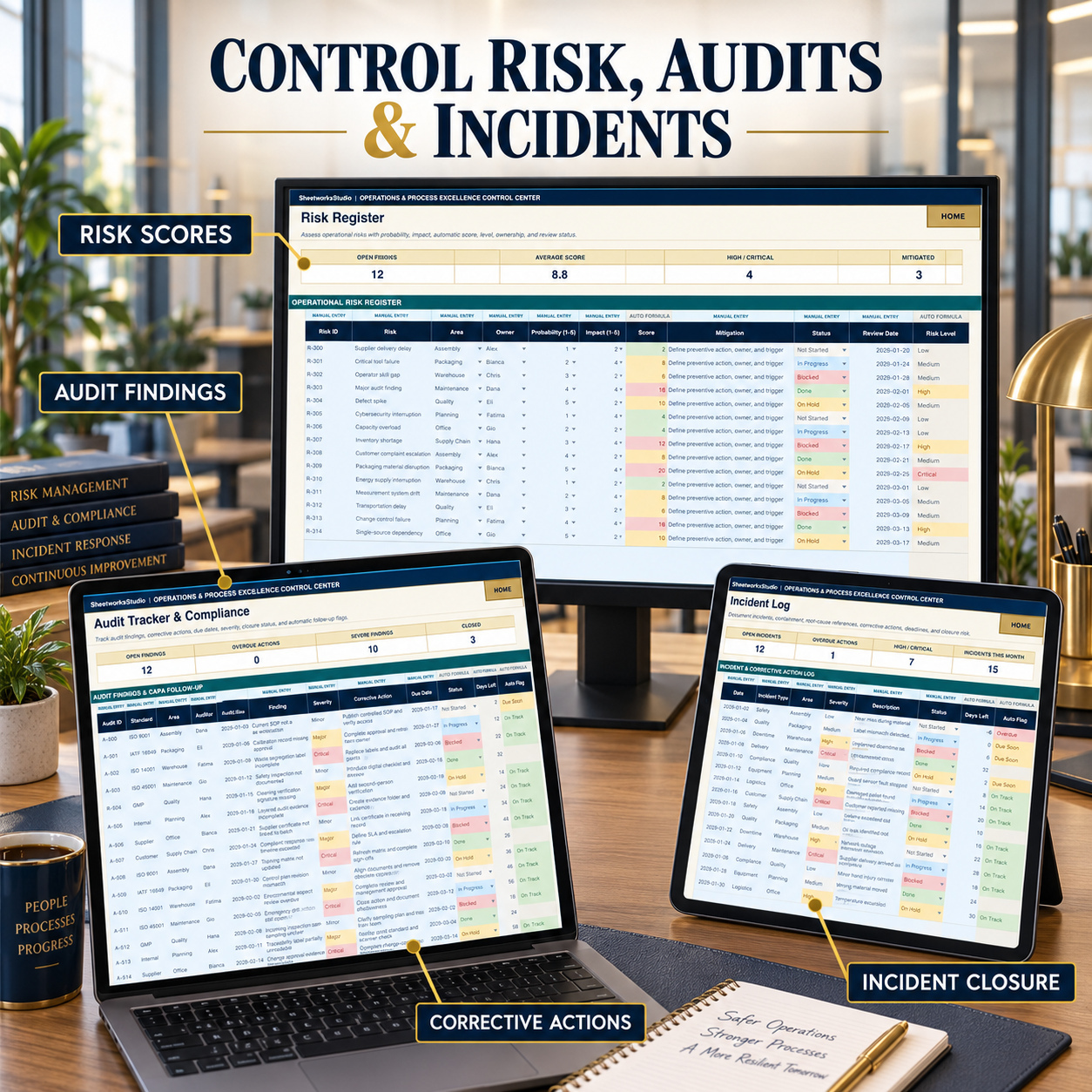
⚠️ RISK MANAGEMENT

The Risk Register evaluates operational exposure through:

βœ… Probability β€” 1 to 5 βœ… Impact β€” 1 to 5 βœ… Automatic Risk Score βœ… Risk Level βœ… Mitigation βœ… Owner βœ… Status βœ… Review Date


Portfolio summaries show open risks, average risk score, High / Critical exposure, and mitigated items.


πŸ” AUDIT & CORRECTIVE ACTION TRACKING

The Audit Tracker supports findings and CAPA follow-up through:

βœ… Standard / Audit Type βœ… Area βœ… Auditor βœ… Audit Date βœ… Finding βœ… Severity βœ… Corrective Action βœ… Due Date βœ… Status βœ… Days Remaining βœ… Automatic Follow-Up Flag


The included illustrative data demonstrates ISO, internal, supplier, customer, and other audit workflows without representing official certification requirements.


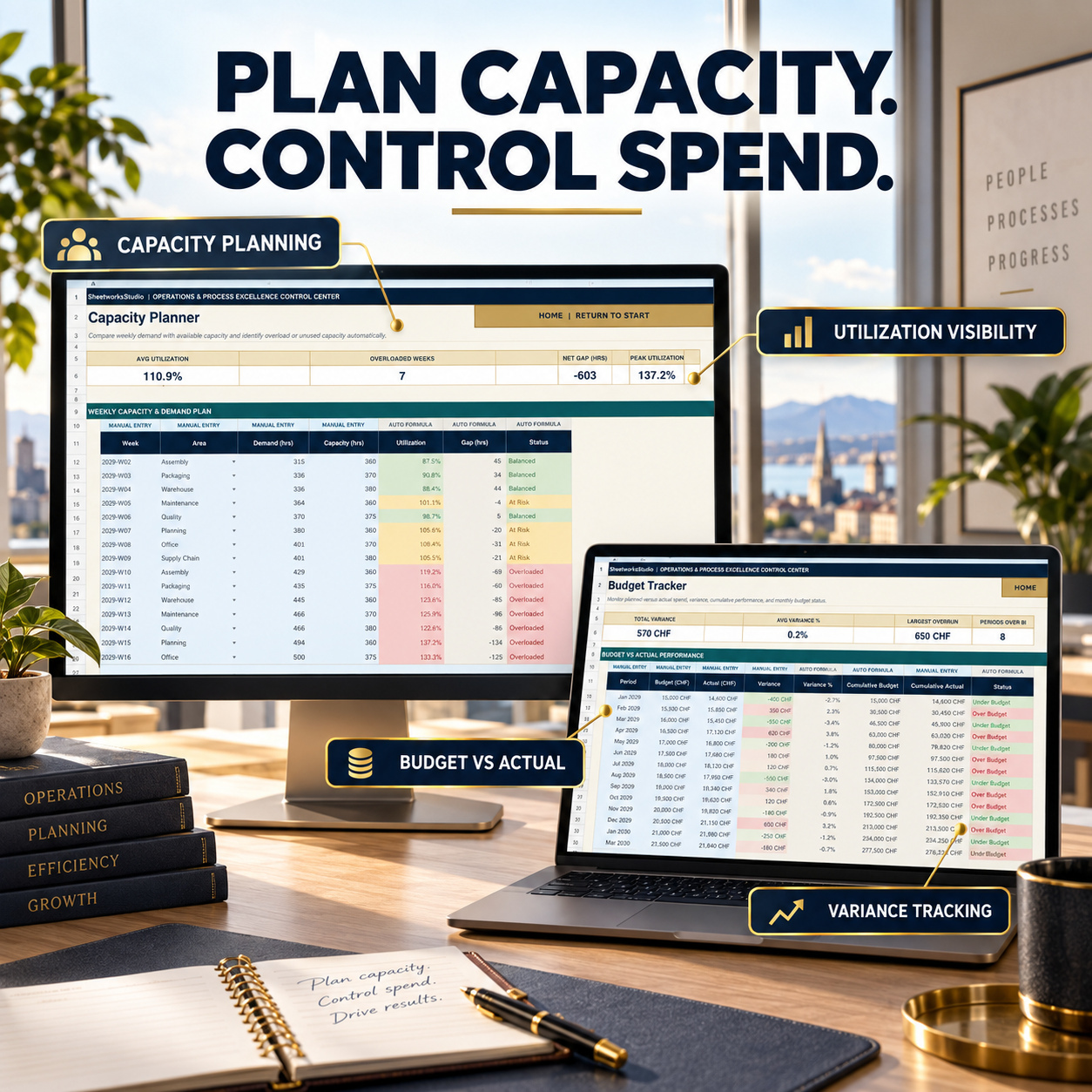
🏭 CAPACITY PLANNING

Compare weekly operational demand against available capacity using:

βœ… Demand Hours βœ… Capacity Hours βœ… Utilization βœ… Capacity Gap βœ… Automatic Status


Management summaries show average utilization, overloaded weeks, net capacity gap, and peak utilization.


πŸ’° BUDGET CONTROL

The Budget Tracker compares:

βœ… Planned Budget βœ… Actual Spend βœ… Variance βœ… Variance % βœ… Cumulative Budget βœ… Cumulative Actual βœ… Budget Status


This allows operational improvement programs to be reviewed alongside financial performance.


🚨 INCIDENT MANAGEMENT

The Incident Log provides structured documentation for:

βœ… Incident Date βœ… Incident Type βœ… Area βœ… Severity βœ… Description βœ… Immediate Action βœ… Root Cause Reference βœ… Corrective Action βœ… Due Date βœ… Status βœ… Days Remaining βœ… Automatic Follow-Up Flag


This helps connect incidents with corrective-action and root-cause workflows.


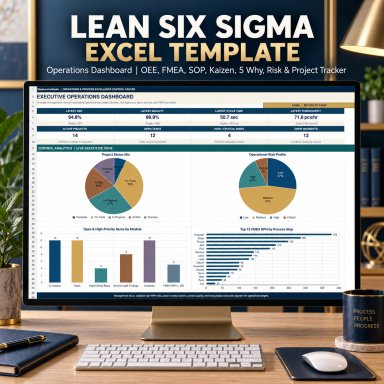
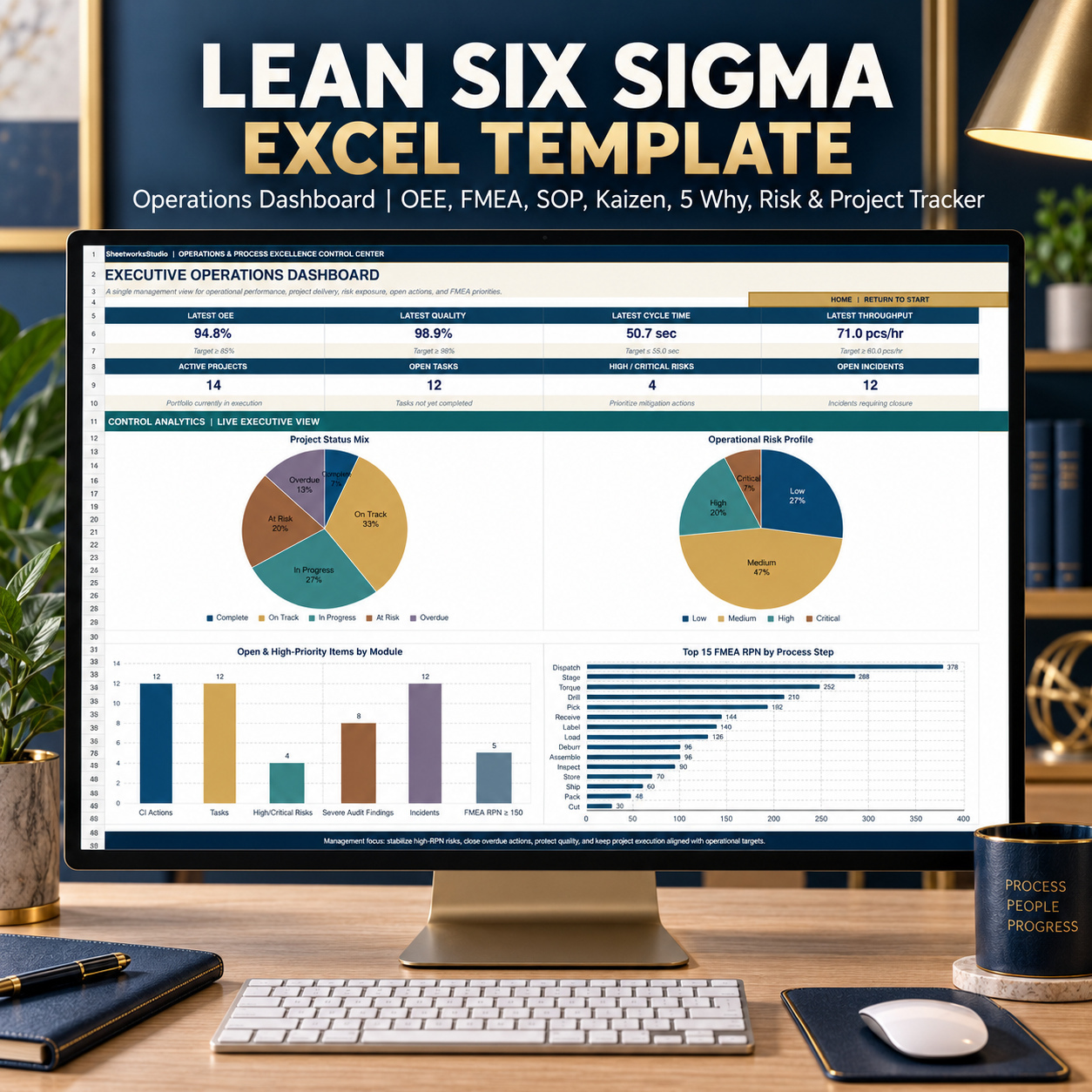
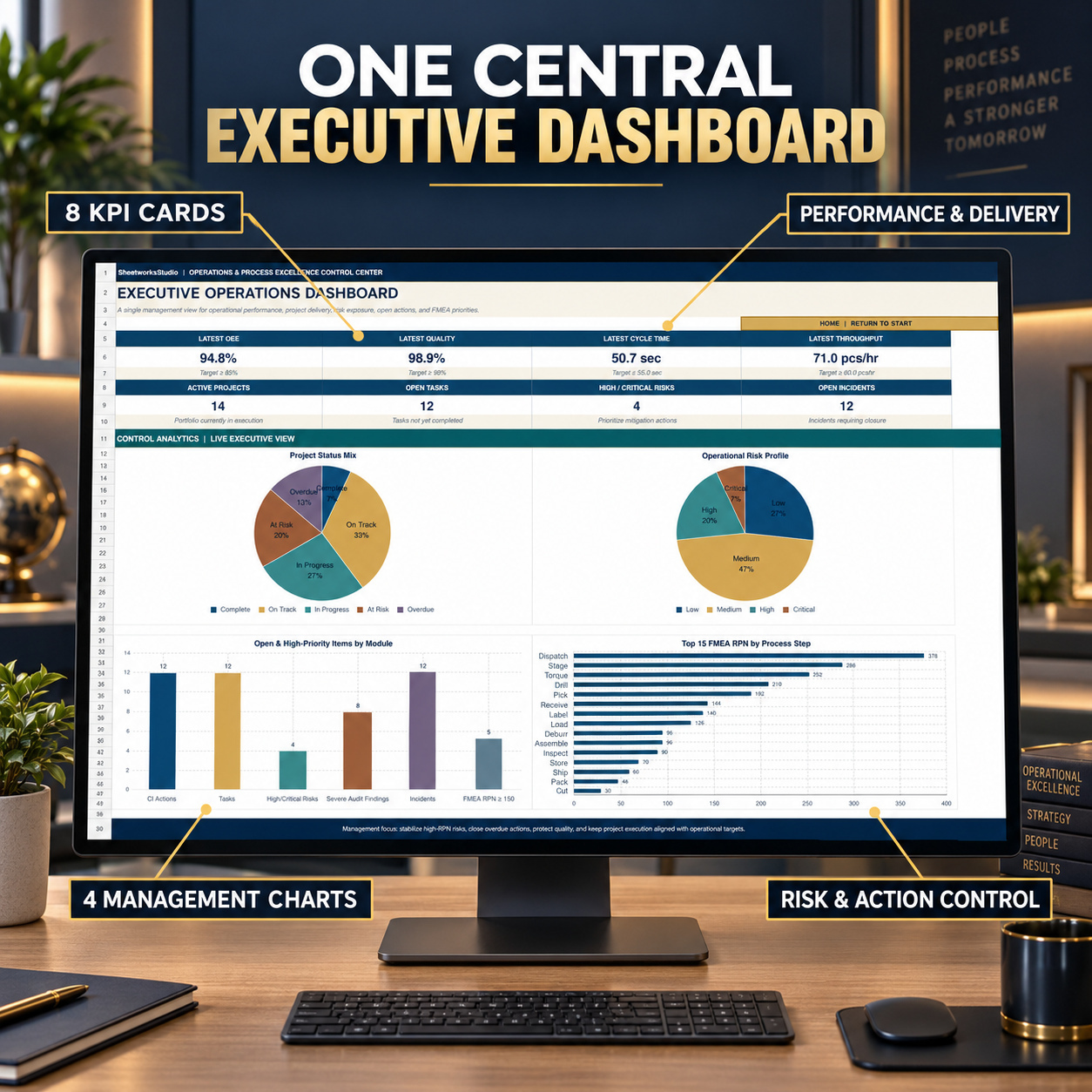
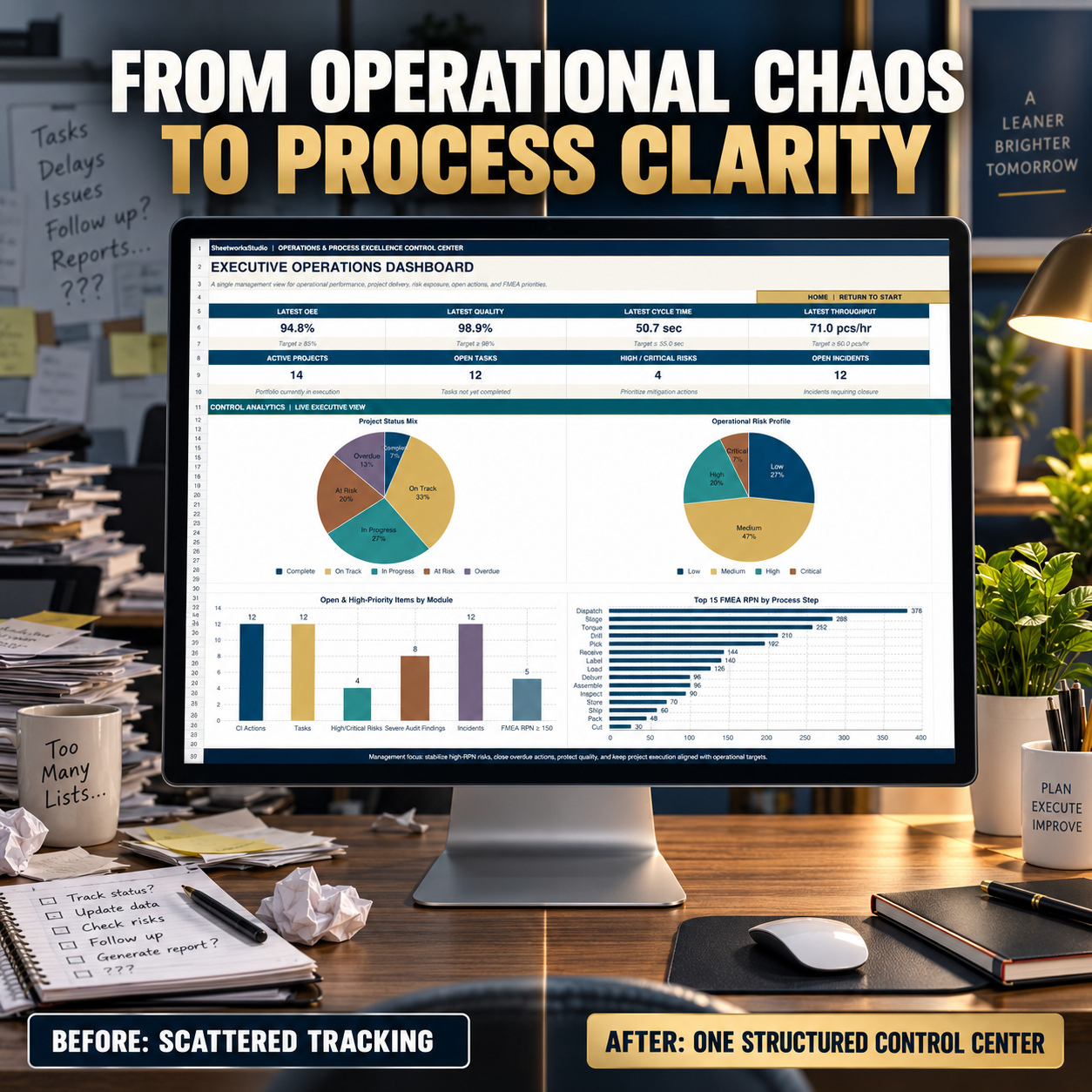
πŸ“Š EXECUTIVE OPERATIONS DASHBOARD

The central dashboard provides 8 management KPI cards:

✨ Latest OEE ✨ Latest Quality ✨ Latest Cycle Time ✨ Latest Throughput ✨ Active Projects ✨ Open Tasks ✨ High / Critical Risks ✨ Open Incidents


Four Excel-native management charts visualize:


πŸ“ˆ Project Status Mix ⚠️ Operational Risk Profile πŸ“Œ Open Actions by Module πŸ§ͺ FMEA RPN Exposure

The dashboard acts as an executive interpretation layer while the underlying tracker modules remain the operational source of truth.


🎁 LEAN QUICK WINS PACK

The separate bonus workbook provides a lighter improvement workflow for rapid team reviews and shopfloor actions.
πŸ’‘ Kaizen Quick Wins Log

Track:

βœ… Problems / Opportunities βœ… Improvement Ideas βœ… Category βœ… Priority βœ… Owner βœ… Status βœ… Due Date βœ… Impact βœ… Estimated Savings βœ… Effort


Automatic WSJF prioritization helps compare improvement opportunities using:

WSJF = (Impact + Savings / 1,000) Γ· Effort

The included tracker contains 15 realistic sample improvement actions.


🧹 5S Audit Tracker

Evaluate:

βœ… Sort βœ… Set in Order βœ… Shine βœ… Standardize βœ… Sustain


Each dimension is scored from 1 to 5, with automatic:

βœ… Total Score βœ… Score % βœ… PASS / IMPROVE Status

The tracker includes 15 realistic sample audits.


πŸ“Š Bonus Mini Dashboard

Monitor:

✨ Open Kaizens ✨ Overdue Kaizens ✨ Average 5S Score ✨ Total Estimated Savings


Two charts visualize:

πŸ“Š Kaizen Status Breakdown πŸ“ˆ Latest 5S Audit Trend


πŸ“˜ 8-PAGE HOW-TO-USE GUIDE

The professional PDF guide covers:

βœ… Setup & Quick Start βœ… Manual Entry vs Auto Formula Logic βœ… Workbook Architecture βœ… KPI / OEE Workflow βœ… SIPOC & Process Mapping βœ… Continuous Improvement βœ… FMEA & RPN βœ… Root Cause Analysis βœ… SOP Development βœ… Projects & Tasks βœ… Risks & Audits βœ… Capacity, Budget & Incidents βœ… Executive Dashboard βœ… Lean Quick Wins Pack βœ… Google Sheets Guidance βœ… Troubleshooting βœ… Operational Rollout Checklist


πŸ’» TECHNICAL COMPATIBILITY

βœ… Microsoft Excel (.xlsx) βœ… Google Sheets import generally supported βœ… No macros or VBA βœ… No additional add-ins required βœ… No external Excel data connections βœ… Formula-driven calculations βœ… Dropdown-supported workflows βœ… Manual Entry / Auto Formula labeling

πŸ“Œ Microsoft Excel Desktop remains the reference environment. After import into Google Sheets, core formulas and dropdowns are generally usable, but navigation, charts, data bars, conditional formatting, spacing, or other visual details may vary.


βš–οΈ IMPORTANT DISCLAIMER

This product is an editable operations, quality-management, process-improvement, and organizational template.

It is not an official Lean Six Sigma certification system, ISO document, regulatory document, governmental document, audit certification, or standards-certified quality-management system.


The templates do not replace legal, regulatory, financial, technical, engineering, safety, quality-management, certification, or other professional advice. All sample information, thresholds, scores, actions, and processes must be reviewed and adapted to the user’s organization and operating environment.


πŸ“Š This complete operations system brings performance measurement, Lean Six Sigma improvement, process analysis, FMEA, root-cause investigation, standardized work, projects, risks, audits, resources, and operational actions into one structured framework. It is designed to help operations and quality teams move from measurement to analysis, improvement, control, and standardized execution with clearer ownership and management visibility.

This Best Practice includes
1 Operations & Process Excellence Control Center (.xlsx), 18 worksheets total, 16 visible operational/navigation tabs

Acquire business license for $39.90

Add to cart

Add to bookmarks

Discuss

Further information

The objective of this Operations & Process Excellence Control Center is to provide operations, quality, Lean Six Sigma, and process-improvement professionals with a structured framework for measuring performance, identifying problems, prioritizing risks, managing corrective actions, and standardizing improved processes.

Users can monitor OEE and operational KPIs, document SIPOC processes, manage continuous-improvement actions, perform FMEA and root-cause analysis, build SOPs, coordinate improvement projects, track risks and audit findings, review capacity and budgets, and maintain incident follow-up within one coordinated system.

The included Lean Quick Wins Pack extends the framework with lightweight Kaizen prioritization and 5S auditing for recurring team or shopfloor improvement cycles.

The overall objective is to support a repeatable measure β†’ analyze β†’ improve β†’ control β†’ standardize workflow while improving visibility, ownership, prioritization, and management reporting.

This system is particularly suitable for:

Lean Six Sigma professionals
Operations managers
Operational excellence teams
Manufacturing teams
Quality managers
Quality engineers
Continuous improvement teams
Process engineers
Production managers
PMO / project teams
Internal auditors
Management consultants
Operations consultants
SMEs and growing organizations

It is particularly useful when operational data, quality issues, projects, risks, audits, improvement actions, SOPs, and incident follow-up are currently managed across disconnected spreadsheets or documents and a more structured control framework is required.

This toolkit does not replace enterprise MES, QMS, ERP, EHS, CMMS, project-management, audit-management, or specialist statistical-analysis platforms.

It is not an official Lean Six Sigma certification framework and does not provide formal ISO, IATF, GMP, regulatory, safety, or quality certification.

The workbook does not contain live production-system integrations, machine connections, APIs, automatic ERP feeds, regulatory databases, or external operational data feeds.

The templates do not constitute legal, regulatory, engineering, financial, technical, safety, quality-management, certification, or professional advice. Users are responsible for validating all thresholds, scoring methods, processes, controls, and outputs for their own operating environment.


0.0 / 5 (0 votes)

please wait...