Overtime & Payroll Calculator – Excel Tool with Automatic Overtime & Double-Time Splitting
Originally published: 14/09/2026 07:58
Publication number: ELQ-88265-1
View all versions & Certificate
certified

Overtime & Payroll Calculator – Excel Tool with Automatic Overtime & Double-Time Splitting

An Excel payroll calculator that converts hours worked into gross and net pay automatically.

Description

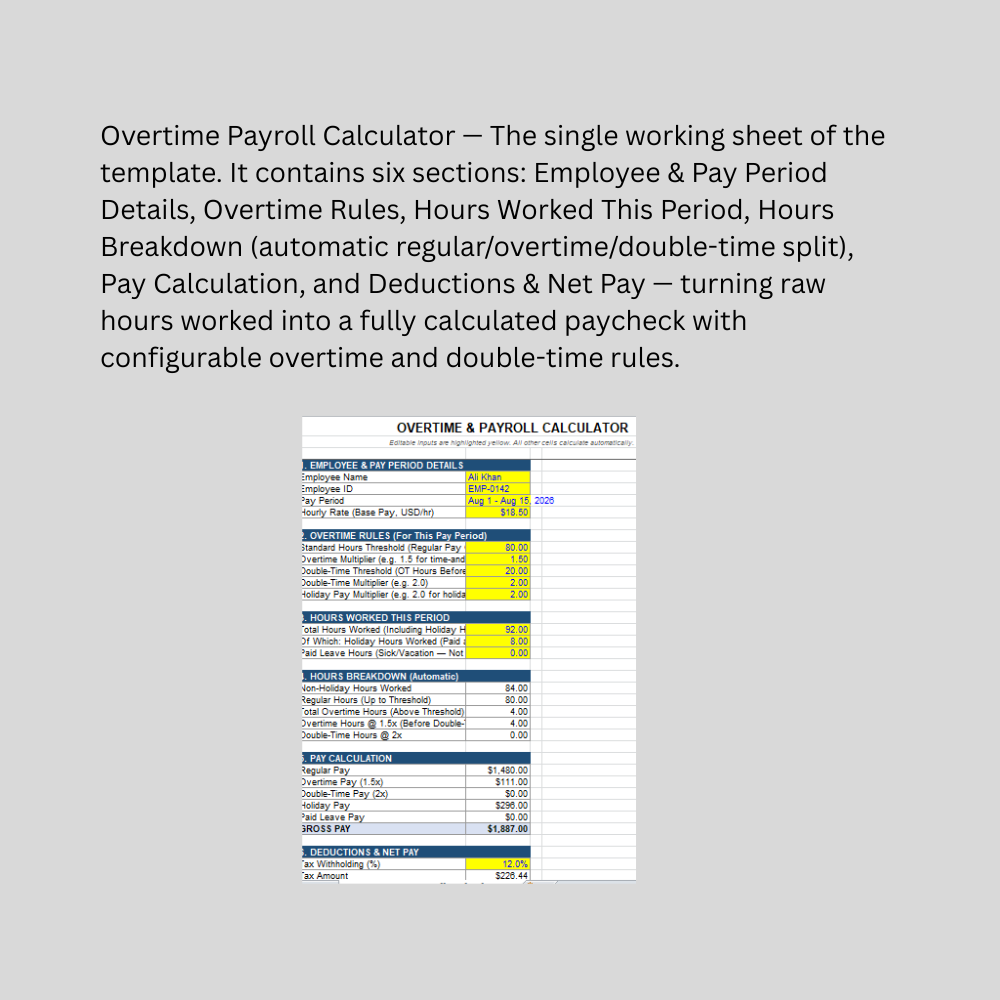
This Overtime & Payroll Calculator is a formula-driven Excel template built for small business owners, HR teams, and payroll administrators who need to calculate an hourly employee's pay accurately without manually splitting hours into regular and overtime categories every pay period. Overtime rules are one of the most error-prone parts of manual payroll — this tool automates the calculation once the thresholds are set correctly.

The template captures employee and pay period details, then lets you configure the overtime rules that apply to your business: a Standard Hours Threshold (40 for weekly payroll, 80 for biweekly, or a prorated figure for other periods), an Overtime Multiplier (typically 1.5x), an optional Double-Time Threshold and Multiplier for hours worked well beyond standard (commonly 2x), and a Holiday Pay Multiplier for hours worked on holidays. From there, you simply enter Total Hours Worked, how many of those were Holiday hours, and any Paid Leave hours — the Hours Breakdown section automatically calculates Regular Hours, Overtime Hours (capped at the double-time threshold if one is set), and Double-Time Hours, with no manual categorization required.

The Pay Calculation section converts every hour category into dollars — Regular Pay, Overtime Pay, Double-Time Pay, Holiday Pay, and Paid Leave Pay — and sums them into Gross Pay. Deductions & Net Pay then applies a tax withholding percentage and any other deductions (health insurance, etc.) to produce the final Net Pay. Every formula recalculates instantly as hours or rates change, and the double-time logic has been tested to correctly split overtime hours across both the 1.5x and 2x tiers when hours run high enough to trigger both.

This Best Practice includes
1 excel dashboard file (xlsm) with instruction set

Acquire business license for $10.00

Add to cart

Add to bookmarks

Discuss

Further information

Automatically split total hours worked into regular, overtime, and double-time categories
Calculate gross pay accurately across multiple pay rate tiers without manual computation
Handle holiday pay and paid leave hours within the same pay calculation
Apply tax withholding and other deductions to produce final net pay
Reduce payroll calculation errors for hourly employees
Save time compared to manually calculating overtime splits every pay period

Small businesses processing hourly employee payroll without dedicated payroll software
HR or payroll administrators needing a quick, per-employee pay calculation
Businesses with configurable but relatively standard overtime structures (single OT rate, optional double-time tier)
Weekly, biweekly, or semi-monthly pay periods with a clear standard-hours threshold
Users who understand their jurisdiction's overtime rules and can input the correct thresholds/multipliers
One employee calculated at a time (not a batch payroll run across an entire team)

Businesses needing full payroll processing (multiple employees at once, direct deposit, tax filing, pay stubs)
Jurisdictions with daily overtime rules (e.g., overtime after 8 hours in a single day) rather than a period-total threshold — this template uses a total-hours-for-the-period model
Complex tax situations requiring multiple tax brackets, jurisdictions, or statutory deductions beyond a flat percentage
Salaried (non-hourly) employee compensation calculations
Union contracts or collective bargaining agreements with non-standard overtime rules
Situations requiring certified payroll records for compliance, audit, or legal purposes — this is a calculation aid only and does not replace payroll software or professional payroll/tax advice


0.0 / 5 (0 votes)

please wait...